|
|

| SatSig Topics Index › Satellite Connection in Africa › iDirect and Channel Master |
SatSig topic: iDirect and Channel Master(Read 10834 times) |
|
Jun 7th, 2006 at 5:28pm
I have seen a few of your replies on VSAT installations forms. I was wondering if you can help us out here. AM REALLY STUCK HERE!!.. We are located in Lusaka Zambia. and our setups are C-Band, with circular polarizations. So our previous setup was: GILAT SKYSTAR 360E with Channel Master 1.8 Meter Dish and a 2 Watt SSPA running on Intelsat 903. EVERYTHING works FINE. We then wanted to upgrade to iDirect 3100 series routers on Intelsat 10-02 We were told that changing the BUC and the LNB was the only thing required to change, and ofcourse the Routers. So we did that, and got our SATMASTER pro software and calculated the look angles accordingly. Then using our Field Strength Meter, UNAOHM EP313, we point on the particular downlink frequency. We manage to get what looks like a clean carrier. So we felt we were pointing in the right direction and decided to plug in the modems now. When we plug in the Modem, we get only one green RX light. NO TX light, and a orange blinking NET light. STATUS and POWER are also green. Then using the iSite Software, we manage to get a good lock, on the RX with a 15+ Volts, in the Green. Now when we do the Cross-Pol test with the HUB, they are not able to see our transmit. We went though a whole process of replacing, LNB, BUC, ROUTERS, CABLES, Polarizaitions. etc getting the same thing. Obviously, when we do a Polarization from LHCP to RHCP, we don't get any thing on the Router. We also did a Sweep of the SKY using the iSite Software, but got a green light with good voltage in ONE spot only. In the same calculated direction. The NOC keeps telling us that we are pointing wrong, but how is it that we are getting a good RX on the the iSite software and that too in ONE position only?? The bottom line is, we are tired of this and no one is able to help us. We are suspecting that it is the CHANNEL master dish and maybe the TRANSMIT REJECT FILTER not compatable with this setup?? ANY HELP OR SUGGESTION WILL BE GREATLY APPRECITATED. Thanks, Aneesh |
|
Jun 7th, 2006 at 7:17pm
https://www.mmtelcom.com/webdex/Tech_support.html Did the modem come pre-programmed for your specific site location?. If not, you need to input your lat/long and satellite location and elevation angle. It says this is critical (in red). It is possible that the software blocks transmission unless you have done this. You saw the NET led flashing yellow. Ask the hub is this is normal if you have found the correct satellite carrier ? The table at the end of the document says it goes solid yellow once locked to the downstream carrier. Have they told you if your new polarisation is opposite to that on the previous satellite ? It is a big job to change the polarisation. You probably need to unbolt the OMT junction from the polariser and reattach in the alternative position. Why did you need new LNB and BUC ? Best regards, Eric. |
|
Oct 21st, 2006 at 1:11am
|
|
Oct 22nd, 2006 at 8:10am
Though I may not able to give an exact solution, let me highlight some points for your kind attention. 1) Circular Plorisation My observation has been that the adjustment of circular polarisation in C-band has lesser effect in the signal strength while compared to the cross-pol / co-pol adjustment for Ku-band. There isn't much we can do or we have to do once the signal is locked to the receive satellite signal while the transmit signal is set automatically for maximum signal strength. I think this is true in your case considering the fact that you were using this antenna with Gilat 360E prior to change over to I-Direct. Hence, I dont think we have to really suspect the antenna capability. 2) C-Band BUC Some of the models of C-BUCs from specific suppliers exhibit inversion in the RF signal output from the BUC. Based on the operating frequency, high or low end, the output could be either inverted or non-inverted. The BUC data sheet will give this information, if not you can re-confirm from the supplier. If the signal is inverted, then you may have to select and configure the modem for inversion, to cancel the effect of inversion due to the BUC. I am sure most of the modern satellite modems have this feature available as an option. However, if the signal is non-inverted, it is fine, you dont have to do anything. See if you find these inputs useful. Anyone may share with or correct me on this with their comments. |
|
Oct 22nd, 2006 at 8:01pm
However, you do need to choose the correct polarisation, since most satellites operate on both polarisations simultaneously. To change the polarisation, you typically need to unbolt the OMT from the polariser and re-attach it after turning the OMT (or the polariser) by 90 deg. ( OMT=Ortho mode transducer, the short metal junction part that transitions from circular waveguide to two rectangular waveguides, tx and rx. This part is the same function as a linear cross-pol Ku band OMT, but much larger and with waveguide sizes suitable for 4/6 GHz.) 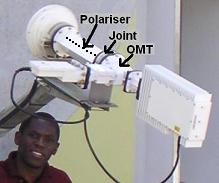 The OMT is attached to the back end of a polariser which is a long tube, circular or square, with lines of pins or slots along two opposite sides. There are two alternative attachment positions for the OMT, at 90 deg to each other. One gives Right Hand Circular Polarisation DOWN and Left Hand Circular Polarisation UP and vice versa. The attachment positions will be with a 45 deg angle between the waveguides and the lines of pins/slots (as shown above). If you, by mistake, attach the OMT with the waveguides and polariser pins/slots aligned, then the polarisar has no effect and you will be using linear polarisation. If you try this with a circular polarisation satellite the wanted signal will be 3 dB low and the opposite polarisation signal will be the same level. If there is a carrier on the opposite polarisation the C/I ratio is 0 dB and it will not work at all. If the other polarisation is clear then you will receive only the wanted signal, 3 dB low, and it will appear that the dish is very poor (half the area). Best regards, Eric. |
|
Jan 10th, 2007 at 4:50pm
 Please give any suggestions how to fix it. Thanks in advance. |
|
Jan 11th, 2007 at 10:40pm
2. IF SOLUTION 1 IS BEEN DONE TRY CHECKING YOUR CABLES BY READING WITH VOLT METER SO AS TO BE SURE THAT YOUR CABLES ARE ALRIGHT OR CHANGE YOUR CABLES TO RG11 OR LMR 400 CABLE WITH NTYPE CONNECTOR, USE A NTYPE TO F CONNECTOR CONVERTER TO CONVERT THE CONNECTOR TO F CONNECTOR TO THE MODEM. 3. IF SOLUTION 2 IS BEEN DONE AND PROBLEM PERSIST CHECK YOUR ANTENNA FEED TO BE SURE IF THERE IS NO WATER OR SPIDER. UN SCREW THE BOLTS AND CLEAN THROUGHLY. DRY IT IN THE SUN AND COUPLE IT BACK. 4. IF SOLUTION 3 IS BEEN DONE AND PROBLEM TRY AN NJT BUC AND RE RUN THE CROSS POL. 5.IF SOLUTION 4 IS BEEN DONE AND PROBLEM PERSIST CONTACT YOUR ISP AND LET THEM CONFIRM YOUR OUTDOOR EQUIPMENT MODEL YOU GAVE TO THEM TO PREPARE OPTION FILE. IT REALY MATTERS THE YOUR EQUIPMENT MOST ESPECIALLY YOUR BUC DOES NOT TALLY WITH THE ONE USED IN CONFIGURING YOUR OPTION FILE. IF THERE ARE CHANGES A NEW OPTION WILL BE GIVEN TO YOU. DONWLOAD INTO THE MODEM AND HAVE A NICE LOCK AND TRANSMISSION. IF ALL THESE SOLUTIONS ARE BEEN DONE AND PROBLEM STILL PERSIST DO NOT HESITATE TO CONTACT ME ON olukmon@svdconsulting.com for more troubleshooting tips on Idirect Platform. Good Luck |
|
May 4th, 2008 at 11:23am
|
|
Email me:eric@satsig.net |