www.satsig.net

Satsig.net home page

Index page for all SatSig topics

SatSig Topics IndexiDirect Forum: hubs and terminals › DHCP Enable and Configure
SatSig topic:

DHCP Enable and Configure

(Read 8062 times)
Oct 6th, 2007 at 6:12pm  
Happy Day
How can I activate the DHCP of 3100 router and set it
Thank you very much for helping
Oct 23rd, 2007 at 5:45pm  
I think this can be done from your service provider, he control everything about the modem remotly...

Or you can save the Option file to your pc and try to modify it , but you may be blocked cause you made changes without they know (service provider) .
Oct 23rd, 2007 at 6:02pm  
Call your service provider.  They control everything (pretty much).
Nov 7th, 2007 at 1:06pm  
As they said, this could be done by the Service Provider, and you should use iBuilder to do this. Even if you edited manually it will not work unless it's matched with the configured settings in the hub site.

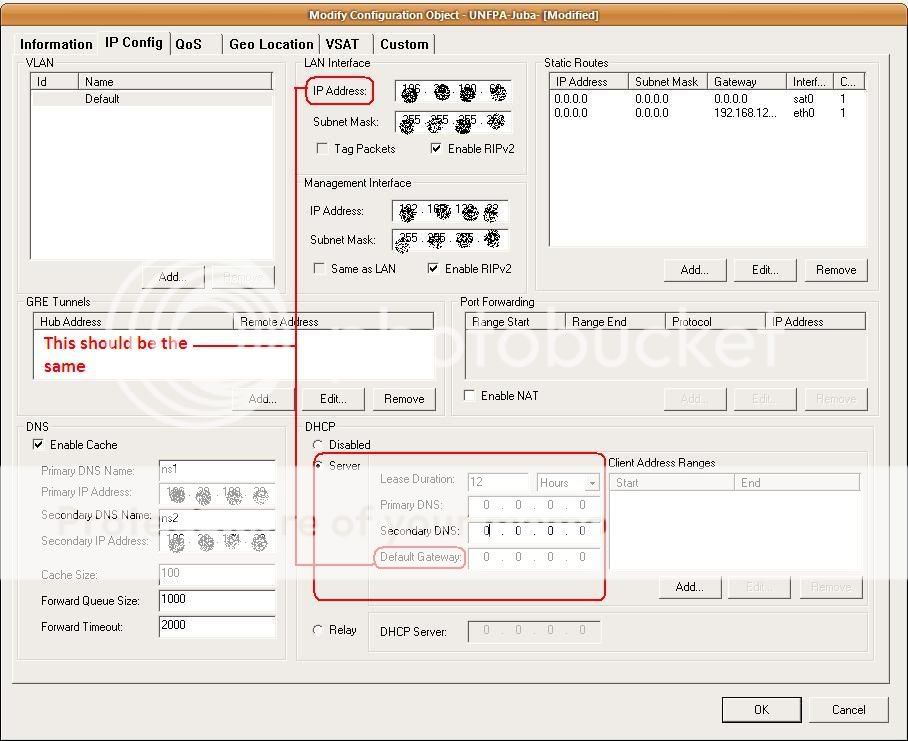
If you an ISP, this is a different story, you may have alook to this picture to get an idea :

...
Nov 19th, 2008 at 7:37pm  
To enable DHCP on your modem, you don't need service provider to do this or ibuilder. Just open opt file in notepad and paste this block in there, make the ip range that of the modem ip. give yourself however many ips you need. and save file and reload opt and your all good to go. thats until the hub resends your modem a new opt file. then they will most likely remove the dhcp, but they wont know and you just get the latest opt file they sent down and remodify and reload and your all setup till next time.

[DHCP_1]
     dhcp_mode = 1
     dhcp_lease_seconds = 43200
     dhcp_lease_range = 69.69.69.1-69.69.69.10
     dhcp_dns_server_ip = use and dns server from web
     dhcp_dns_server2_ip = google for a root dns ip
     dhcp_gateway_ip = modem ip address

www.satsig.net

Email me:eric@satsig.net

Disclaimer, Terms of Use and Privacy

Old Forum rules

Cookie policy.