|
|

| SatSig Topics Index › HughesNet and Hughes HX VSATs › HX50 TXCode 13 |
SatSig topic: HX50 TXCode 13(Read 12092 times) |
|
Nov 19th, 2007 at 8:55pm
|
|
Nov 19th, 2007 at 9:47pm
By the way - TX13 **The NOC is not receiving ranging information from the transmitter. This may indicate a transmit problem at the NOC. This should get cleared in a few minutes. **The transmitter is unable to achieve enough transmit power to send ranging information to the NOC. Make sure that the power supply is correct. The power supply should be Part #1031105-0001. **The transmitter is sending incorrect timing data because the wrong zip code or latitude/longitude information was entered during installation. **The outdoor transmitter unit (ODU) is not operating properly or is not properly connected to the ITU. Please ensure that the transmit cable is securely fastened to the Transmit Unit. This information can be found in your user interface. Click on Transmission Info, then Transmit Status. Find the Error Code specified, click on it for amplifying info. Similar path for RX Error Codes under Reception Info //greg// |
|
Nov 19th, 2007 at 9:57pm
What I meant was that he wanted me to flip flop on each side to see if maybe one of the coax cables were busted... I'm still in the process of setting it up... It does say though that it has been commissioned and that the keys are updated... It seems like it has been downloading something for the past 2 days, since I've first got the signal... it hasn't worked yet as I have ran into this error... The actual error message that pops up is 'Can't Range. No Link with the Network Operations Center.' Hope this helps with the troubleshooting... Any Suggestions? Thanks! Jason CHANGE: Looking at the System Status, it says Commissioned[Keys Updated] and System Info says Not_Commissioned... |
|
Nov 20th, 2007 at 12:09am
Relative to the System Status; interpret that to mean that the commissioning process has successfully progressed to the point of having received keys, but has not yet run to a successful competion //greg// |
|
Nov 20th, 2007 at 1:30am
I looked up how to do the ACP Test... My signal is locked yet the Perform ACP check mark does not appear... I'm doing Manual Commissioning, does that affect weither or not I'd be able to perform an ACP check? I'm sorry i'm not that savi on satellites... This happens to be the first one I am setting up by myself... Kinda a Noob at this... Thanks for all your help again... From what I been reading here you seem like a genius at this... Jason |
|
Nov 20th, 2007 at 2:11am
//greg// |
|
Nov 20th, 2007 at 2:28am
I'm reading the HX50:W3a manual as well as some others i've downloaded from various Wafa/Hughes websites... the main one I've been reading, and was sent to be from a Wafa tech doesn't mention anything about ACP... It mentions that once you get a solid signal and Rx is locked on, "When the HX50 locks onto the Rx carrier the Tx will auto-enable (a feature of the W3a HX service), it will automatically range in on its allocated inroute, the speed of the inroute will vary from site to site depending on the sites data requirements/level of service." is this the same thing? Does this make sense? Jason |
|
Nov 20th, 2007 at 10:17am
To set the polarisation angle, the entire antenna should be rotated clockwise by approx +45 deg (for Iraq and W3A), while facing towards the satellite. Set your polarisation angle exactly to the calculated value plus 3.5 deg using the large scale at the rear. If the hub has not asked you to do ACP testing don't. Your antenna should look like this (for Iraq and W3A): 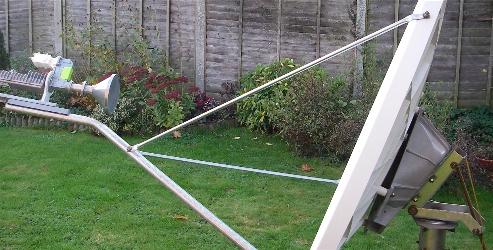 Pointing. The signal power now from the W3A satellite is exceptionally high so it is easy to find the satellite, but just any very high reading does not mean it is good enough. For example: If you get a reading of 90 and the maximum possible is 97, then the 90 represents bad and unacceptable pointing. The receive side may work fine but the transmit won't. You need to get to the exact receive beam centre so that the narrower transmit beam is pointed properly. In azimuth I suggest loosening both nuts 1 turn (i.e. 6 flats) and then gently pulling and pushing the dish to rest against each nut alternately. Adjust the nuts till you get exactly the same degraded signal on each side (e.g. 51) The exact number does not matter, what does is that both numbers should identical. Then wind in both nuts by the same number of flats so that you are in the exact centre. In elevation, mark one flat on the lower nut with felt tip pen. Wind the lower nut in 1/2 turn increments and record the quality at each position, then adjust back to the peak. None of the above may help with your particular problem, but the above is for other readers also. Check your transmit cable is connected to the IFL (inter facility link) socket on the transmit module. The adjacent socket, marked API, is not used and should have a cover over it. Check your location coordinates again in the configuration page. Check all the other details also. Send me a copy of the configuration document to eric@satsig.net and I will look at it to see if I can spot any typos that might explain the problem. It is not a good idea to connect up the transmit cable until you have a perfect receive signal and dish pointing is finished. Then power off at the AC mains wall switch (never disconnect the low volatege DC cable between the power supply module and the modem). Then connect up the transmit coax cable. Then phone the hub and power on when told. Do not touch or interfere with the antenna or modem during commissioning, while new software is being downloaded and configured. Best regards, Eric. |
|
Nov 20th, 2007 at 1:41pm
Greg I'm reading the HX50:W3a manual as well as some others i've downloaded from various Wafa/Hughes websites... the main one I've been reading, and was sent to be from a Wafa tech doesn't mention anything about ACP... It mentions that once you get a solid signal and Rx is locked on, "When the HX50 locks onto the Rx carrier the Tx will auto-enable (a feature of the W3a HX service), it will automatically range in on its allocated inroute, the speed of the inroute will vary from site to site depending on the sites data requirements/level of service." is this the same thing? Does this make sense? Jason I've only just recently obtained HX50 documentation - haven't been able to devote much time to it - so perhaps it's best if Eric handle the rest of this until I make time. But in working with other HX50 users, I was led to believe the user interface was very similar to my 7000 interface. What you describe to me sounds like day-to-day operation (RX locks>TX energizes>set link parameters) rather than installation procedure. My interface requires the manual ACP option be selected by the customer/installer while optimizing the POL angle of the ODU. When meeting/exceeding minimum transmitter isolation standards, the registration process moves on to ranging. Then it moves on to establishing inroute/outroute operating parameters. Once operational, transmitter isolation (ACP) revalidation reverts to automatic mode. But if there are more differences between our user interface than I realize, please bear with me while I study the actual HX50 documentation for comparison. In the mean time, take a look at Eric's recommended registration procedure: https://www.satsig.net/bentley-walker/hx/hx-vsat-remote.htm //greg// |
|
Nov 20th, 2007 at 2:36pm
i understand the site is 100% ok |
|
Nov 20th, 2007 at 4:40pm
So after I got off shift last night I decided to mess around to see if I could get a better signal than 92... And it turns out that once I peaked it to 96, my errors went away... I have talked with Wafa and my internet should be running momentarily... I will keep you updated soon.... Thanks sooooo so so so much for all your help Greg! And that guide you made Eric is awesome! Jason |
|
Nov 20th, 2007 at 5:10pm
Best regards, Eric. |
|
Nov 20th, 2007 at 5:34pm
Jason |
|
Nov 20th, 2007 at 5:47pm
Please provide the serial number and we will telnet in and fix the problem BW please email james@bentleywalker.com |
|
Nov 20th, 2007 at 8:25pm
Dear Jason Please provide the serial number and we will telnet in and fix the problem BW please email james@bentleywalker.com A. Walker I sent the email and am waiting for reply. Thank you so much for helping me out with this. Jason |
|
Nov 21st, 2007 at 10:17pm
Jason |
|
Email me:eric@satsig.net |