|
|

| SatSig Topics Index › HughesNet and Hughes HX VSATs › Hughes system Mosul, Iraq |
SatSig topic: Hughes system Mosul, Iraq(Read 18280 times) |
|
Aug 20th, 2008 at 8:18am
Is there a better Rx/Tx setup that I should use here in Mosul? |
|
Aug 20th, 2008 at 9:27am
It is possible, but unlikely, that the BUC and LNB are damaged internally due to superficial external damage. I've seen BUCs that have been dropped onto concrete resulting in bent cooling fins, and they still worked normally. Changes to the signal quality when you tighten the mount is normal. You must make further small adjustment while tightening to maintain the peak value. Even after you have found the correct satellite, peaking up the dish pointing requires much further effort, particularly on a large dish like 1.8m. Corrosion, moisture and workmanship on the F connectors are the major source of problems. Waggle the cable to the LNB. The signal quality should be unaffected. When I see the image of your yoke/BUC/LNB I can advice further. Regarding a better option, you should consider upgrading to the HX modem. Best regards, Eric. |
|
Aug 20th, 2008 at 11:04am
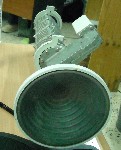 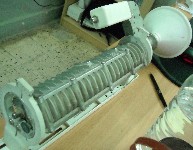 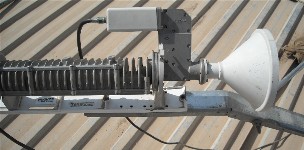 None of these cause me any concern regarding damage. You have it set to: Horizontal nominal polarisation with +45 deg adjustment applied. or (same thing) Vertical nominal polarisation with -45 deg adjustment applied. Set the adjustment angle accurately using the rear yoke scale. The rotation direction is with you facing towards the satellite, clockwise is positive. See first image above. Best regards, Eric. |
|
Aug 31st, 2008 at 7:35am
hey i am here in mosul at 1-8 inf on marez contact me at allenatkison@yahoo .com i would like to talk to you and see if you get it to work as i am looking to buy one myself thanks allen |
|
Sep 1st, 2008 at 2:01pm
pls email us on sales@wafa.ae Regards |
|
Sep 3rd, 2008 at 11:47am
|
|
Sep 3rd, 2008 at 1:50pm
We are expediting the move to W3a immediately and you will have the required details ASAP. |
|
Sep 3rd, 2008 at 2:06pm
Parameters for reconfiguring the modem have been emailed to you. James Bentley Walker Ltd |
|
Sep 4th, 2008 at 10:52am
We have identified an outstanding problem with the signal levels displayed on your modem, this is in most cases this is down to either alignment or the configuration of the modem, assuming that the equipment is 100%. Please continue to liaise with our team on troubleshooting so that we can help you to resolve it. Assuring you to of our full attention at all times. James BW |
|
Sep 8th, 2008 at 4:22pm
|
|
Sep 8th, 2008 at 6:22pm
Regarding the modem, the possibility of damage is uncertain. Before going further the advice about powering on/off is as follows. Always power on/off using the AC mains wall plug/switch. Always leave the multi-way low voltage DC power cable, between the power supply module and the modem, connected. Don't connect or disconnect the coax cables with the power on. Regarding connecting up the LNB to the coax cable I would advise caution, even when the AC mains power is off. Antenna structures may have quite different voltages (RF, static or mains related) from the earth ground potential inside the building where the modem is located. If in doubt put a short wire from the outside of the coax to the outside of the LNB before inserting the pin. Don't hold the end of the LNB cable in your hand while your body is at site potential. An AC volt meter between the cable braid outer and the local structure can be very reassuring - especially if you are up a mast. Local electrical regulations vary from country to country but proper earthing of the antenna is often a requirement for safety and lightning protection. But this does not guarantee safety, if the ground is not a good conductor and there are multiple mains generators and power sources feeding multiple buildings which are not mutually earthed to one another. If you measure the DC voltage across the end of the LNB cable between the centre pin and the braid, and the result is zero or negligible volts then the modem has been damaged or there is a short circuit in the cable or the F connector at the modem end is not plugged in properly - is the pin the correct length, 1.5mm proud of the rim ?. Normally you should see something like +13 to +19 volts DC out of the RX IN (LNB) socket. Don't do this test if you are not confident to make the tests without short circuiting the LNB DC supply up the cable. Anyway, I'm hoping optimistically that there is no damage in your case. Reviewing this thread I note that you are now trying to receive from the W3A satellite. Please say: What type modem are you now using ? DW6000 or a new HX ? What name (nominal) polarisation have you been told to receive ? What is the satellite downlink carrier frequency ? What is the type and model number of your LNB ? If you are using the 2784H then it has a 10 GHz LO frequency and this must make sense with whatever carrier your are trying to receive from W3A. (Sat freq - minus LO freq = modem tuning freq.) What frequency and symbol rate have you been told to put into the modem ? Best regards, Eric. |
|
Sep 9th, 2008 at 12:46pm
I still have the 2784H for my LNB. Vertical LNB polarization. I was told to use 38.8 polarization. 13868 is the Satellite Channel Frequency I was given. Recieve Symbol Rate is 30000000. |
|
Sep 9th, 2008 at 6:04pm
Its Local Oscillator frequency is 10000 MHz. Vertical LNB polarization. This means that your polarisation starting position is with the broad faces of the LNB waveguide on top and underneath. The filter side arm supporting the LNB will be sticking out horizontally, at one side or the other. I was told to use 38.8 polarization. You need to face towards the satellite and turn the polarisation by 38.8 deg clockwise. That angle makes sense for Mosul and W3A. You may find that final tweeking by a further +3.5 deg helps. 13868 is the Satellite Channel Frequency I was given. Recieve Symbol Rate is 30000000. I am not sure about this data. The tuning frequency depends on your LNB LO, which may not be suitable. In theory 10000 MHz + 1386.8 MHz = 11386.8 MHz. I can't see anything there from here in the UK and I think I am in the same W3A beam as you. ref: https://www.satsig.net/spectrums/satellite-spectrum.htm On W1 there are a couple of DirecWay carriers at V 11526 MHz and V 11596 MHz. But I don't know if your DW6000 modem can tune as high as 1526 MHz or 1596 MHz. What happens on the screen if you try to configure frequencies like 15260 or 15960 (units of 100kHz) ? Inserted: Greg has just emailed me regarding L band tuning range of DW6000: Active DW6000 L-band center freqs range from a low of 970 MHz to a high of 1470MHz. So call it 950 to 1500MHz. What polarisation and tuning did you try for W1 ? I will investigate more tomorrow. Best regards, Eric. |
|
Sep 9th, 2008 at 7:58pm
Seems to me that taking advantage of the free HX50 hardware over there (assuming you're a serviceman) should be a no-brainer. If I understand correctly, the offer includes both indoor and outdoor equipment (hopefully to include grounding hardware) - at no cost to the US military customer. Pretty sure I read that both Bentley-Walker and WafaNet are making this free equipment offer. The way I see it, the only real decision is whether or not ya'all agree to the terms of service. //greg// |
|
Sep 10th, 2008 at 10:21am
What polarisation and tuning did you try for W1 ? I was given the Satellite Channel Frequency of 15980 and a polarization of 36 when I was trying for W1. I guess it was a bit beyond my frequency abilities with the DW6000? Do I need to try a different frequency than what I am on with W3A? I hadn't found this forum until after purchasing the system. Fortunately BW is offering to do a free swap out for my possibly broken modem. The soldier I bought the system from is pretty certain that the system is still functional and has been deligently trying to help me get online. I will be back up on the roof this evening to fiddle with the polarization some more to see if anything comes from that. I have a distinct feeling that the disfunction stems from the modem, but I am no pro in this field. Obviously. |
|
Sep 10th, 2008 at 12:47pm
If you try for that with your 10000 MHz LNB then the tuning frequency in your modem needs to be 1598 MHz (input 15980, in units of 100kHz). Note there is doubt that your modem will accept this tuning frequency, as it appears to be intended only for tuning 950 - 1500 MHz. To be certain you need an LNB with LO=10600 MHz as this would bring the tuning result down to 998 MHz, which is definitely in range (input 9980, in units of 100kHz). If you are working on the polarisation remember that true vertical polarisation is your starting position. The broad faces of the LNB rectangular waveguide will be on top and underneath. The filter arm with the LNB on the end will be sticking out sideways. Then, step 2, apply the polarisation adjustment. To set +40 deg, face towards the satellite and turn the feed +40 deg clockwise. If the LNB had been sticking out to the right is will now be to the lower right - with you facing towards the satellite (see middle pictures). If you were applying say +70 deg polarisation adjustment you might find that the filter hits the support tube or yoke. In this case, start on the other side. Three polarisation starting positions: 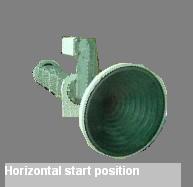 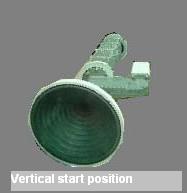 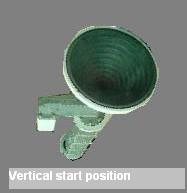 All the above apply to antennas which have the feed arm permanently at the bottom and require the polarisation to be set by rotating the feed/BUC/LNB assembly in its yoke. Three examples below show +30 deg clockwise adjustment applied. 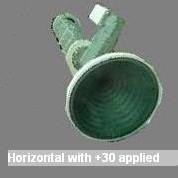 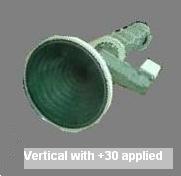 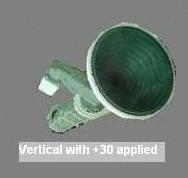 All the above apply to antennas which have the feed arm permanently at the bottom and require the polarisation to be set by rotating the feed/BUC/LNB assembly in its yoke. |
|
Sep 12th, 2008 at 2:34pm
|
|
Sep 12th, 2008 at 7:35pm
There are similar Turksat carriers on both polarisations only 2 MHz apart so the satfinder is likely to say "W3A found" regardless of the polarisation you have set. The person who programmed the satfinder will have had to make an assumpion about the LNB local oscillator frequency you are using as the satfinder is an L band receiver (probably 950-2150 MHz) and can only see what comes to it via the LNB cable. Its display of 11637 MHz is the addition of the actual tuning frequency and an assumption about the LNB in use. There is no point adjusting your modem to receive Turksat TV. 11637 MHz - 10000 MHz = 16370 (units of 100kHz) is believed to be outside the tuning range of your DW6000 modem (950 - 1500 MHz ?) - but you are welcome to try. Other suggested carrier, which I can see, for receive testing only (NB: Opensky, not Direcway) ... 11262 MHz H 27500 ksps. Tune 12620 (units of 100kHz) Note this is Horizontal nominal polarisation, so change your polarisation. The 12620 is definitely within the tuning range of your modem. I am not convinced we are getting anywhere, as we don't appear to have a plan to receive a Direcway 6000 type carrier that is compatible with your particular LNB. Does anyone know of a Direcway 6000 compatible downlink carrier that is still in service and operates between 10950 - 11500 MHz and has coverage of Iraq ? Best regards, Eric. |
|
Dec 21st, 2009 at 8:04pm
|
|
Dec 21st, 2009 at 9:01pm
//greg// |
|
Dec 22nd, 2009 at 6:48pm
|
|
Email me:eric@satsig.net |