www.satsig.net

Satsig.net home page

Index page for all SatSig topics

SatSig Topics IndexiDirect Forum: hubs and terminals › no ip connectivity from my remote 3100?
SatSig topic:

no ip connectivity from my remote 3100?

(Read 6665 times)
Jun 4th, 2009 at 11:17am  
hello guys

i got an option file from isp with my modem sn & did after i upload it to my modem then reseting

my modem stop giving ip to my laptop through lan cross cable i tried to set ip manually which i got from opt file but even that not help me i still can't ping my modem or telnet to it


any ideas as quick as you can

thank you
Jun 4th, 2009 at 12:46pm  
1.  Have you changed the TCP/IP properties of your laptop, so that it resides in the same subnet?

2.  If you have done the above, ICMP should be possible between client and the iDirect.  If it isnt, confirm your modems ip address (aka the default GW - which is the modems Eth0 address) and double check the properties of the laptop as well, to ensure that the client occupies an address in that subnet. 

3.  Once ICMP is possible, confirm that you can latch onto the iDirect with iSite.  If you cannot, double check to see if your iSite version matches the IDS version of your options file (you can find the version information in the first few blocks of the options file - ensure they match).

M
Jun 4th, 2009 at 2:57pm  
1-i didn't change my laptop tcp/ip properties in any way

2-wht you mean by that (ICMP)


my isite version is suitable

after i check the opt file i uploaded to my 3100 modem i see that the model written in opt file is for 5100


how can i make RJ-45 to DB-9 Female DTE Adapter cause i can't find it here in my region so i can connet to my modem through console
Jun 4th, 2009 at 3:18pm  
You must change your laptop properties to occupy an address within that subnet. That is the reason why you cannot talk to the iDirect unit (IDU). 

Internet Control Message Protocol (ICMP) = A ping

It is recommended that you have a decent understanding of Network Fundamentals/basics before you leap into this.

Jun 4th, 2009 at 3:37pm  
this is my remote ip settings (from opt file):

modem ip 85.31.76.1
subnet mask 255.255.255.248
dns  85.31.76.1
       85.31.66.4

i tried  to set my laptop ip manually as follow:

ip   85.31.76.2
subnet mask   255.255.255.248
gateway         85.31.76.1

dns                85.31.76.1
                    85.31.66.4

but i can't even ping my modem?

how to make RJ-45 to DB-9 Female DTE Adapter?

*what is the user name of  os_password for idirect  modem

Thank you in advance
Jun 4th, 2009 at 5:34pm  
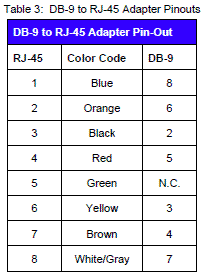
The iDirect Remote Installation Guide has this table:
...

I am no expert on iDirect but as far as I can see only the purpose of the DB9-RJ45 cable is to set up a hyperterminal/telnet session simply to find out what is the modem IP address and subnet mask.

Once you know that you can use iSite to load new software images, option file etc.

Best regards, Eric.
Jun 4th, 2009 at 8:24pm  
Quote:
The iDirect Remote Installation Guide has this table:
https://www.satsig.net/idirect-am1/db9-rj45-adaptor-pin-out.gif

I am no expert on iDirect but as far as I can see only the purpose of the DB9-RJ45 cable is to set up a hyperterminal/telnet session simply to find out what is the modem IP address and subnet mask.

Once you know that you can use iSite to load new software images, option file etc.

Best regards, Eric.


firs of all thank you

as i know by using  DB9-RJ45 cable i can access my modem without ip . cause it communicate through com port

so i can past new option file from linux console as a result my modem will return to it's normal state

is that right  TDMAMike ?

Jun 5th, 2009 at 11:51am  
You can paste in ANY options file via console.  Just realize that the unit will be configured to the parameters contained in whatever options file you put in it.

Jun 5th, 2009 at 1:41pm  
and to find out your ip through linux type    

ifconfig ixp0

Then you can manually set it from there... Pasting will work as well but this is just so you have an understanding... 

You asked for a password... I'm assuming for linux via serial cable?  u/n - root   pass - iDirect

Jun 5th, 2009 at 6:03pm  
Thank you guys

www.satsig.net

Email me:eric@satsig.net

Disclaimer, Terms of Use and Privacy

Old Forum rules

Cookie policy.