|
|

| SatSig Topics Index › HughesNet and Hughes HX VSATs › HX 50 Tallil, Iraq |
SatSig topic: HX 50 Tallil, Iraq(Read 8587 times) |
|
Jun 20th, 2009 at 6:34pm
I've checked rechecked and swapped COAX cables (with the modem powered off of course) But now something weird has started to happen-- no matter where I point the dish, I get a 15 sig strength. I was intrigued, so I powered off the modem, disconnected the COAX and then powered the modem back on-- the sig strength is still reading 15! Everything is disconnected at this point and I have been struggling with this connection for 3 days. Like I said before, WAFA has seen my screenshot and they say the settings are correct, but I am not pointed.. Believe me I went 10 degrees in each direction, spent about 10 hours trying to get past 15-29 (to include polarizing the BUC) and I am pointed in the same general direction as other data sats in my area. Are there any other SATS I can aim at? If anyone can help out it would be appreciated, I can send pics of everything- installation/screenshots. My e-mail link is to the left! Thanks! Chris |
|
Jun 20th, 2009 at 6:44pm
Start by posting the satellite parameters given to you by WAFA, and the Az/El/Pol angles as observed on the gradient scales on your antenna bracket. Photos would help greatly. //greg// |
|
Jun 20th, 2009 at 9:18pm
I'll Start by showing my params/AZ/ELE/POL: [IMG]https://i41.tinypic.com/22gx85.jpg[/IMG] [IMG]https://i41.tinypic.com/2w4eahg.jpg[/IMG] I'll take more pic in the morning, Its almost midnight here! Thanks again! Chris |
|
Jun 21st, 2009 at 10:27am
Remember to power off at the mains wall switch before either disconnecting or connecting the coaxial cables. The receive side should work and dish pointing should be possible with just the LNB cable connected at both ends and the transmit cable disconnected at both ends. Set your polarisation name according to told written/verbal instructions from WAFA, not by the "Vertical name" it says on the configuration display, which may or may not be correct. The config display text is of no consequence as your polarisation is set manually by you at the antenna, not by the modem. Having set the named polarisation apply the polarisation adjustment angle. Best regards, Eric. |
|
Jun 21st, 2009 at 1:22pm
Earlier (yesterday) the sig would go from 1-20-28/29 but now it is stuck at 15 (since last night no matter where I point the dish)... I let it sit over night without anthing attached and here is what I got this morning when I hooked just the power up with the LAN attached... [IMG]https://i39.tinypic.com/6z7uz9.jpg[/IMG] I've been online with WaFa and they keep asking me if I have the cables hooked up... When I do hook just 1 (LNB) it says 15, when I hook up both, it says 15.. I did a config reset thru hyperterminal, but all that was was clearing the settings from the RPR, I re-input the setting again and it still reads 15!! I ALWAYS DISCONNECT POWER BEFORE DISCONNECTING/CONNECTING THE COAX. Is there a way to flash this with Firmware or do a "hard" reset to clear this problem?? -Chris |
|
Jun 21st, 2009 at 4:39pm
What command did you use to do this "config reset " ? The reset to factory default may be a different command. If you need the reset to factory default command follow advice first from WAFA (1st level tech support for the HX network), or possibly from Bentley Walker (2nd level tech support for the HX network). Best regards, Eric. |
|
Jun 22nd, 2009 at 10:40am
in hands now awaiting Chris' updates to us |
|
Jun 22nd, 2009 at 10:41am
-Chris |
|
Jun 22nd, 2009 at 5:46pm
Seek advice from WAFA regarding if you should do reset to factory default. They will tell you the command to use if they say it is needed. I'm not giving you the command in case it permanently deletes something important. Do only what WAFA say. It is their responsibility to fix your problem. Best regards, Eric. |
|
Jul 3rd, 2009 at 10:17am
[IMG]https://i42.tinypic.com/dbnqlj.jpg[/IMG] 240 SPAN [IMG]https://i44.tinypic.com/33o5j6o.jpg[/IMG] [IMG]https://i41.tinypic.com/2l9gsco.jpg[/IMG] I get up to 85 on some carriers when I am doing my sweep. I have yet to be able to attain a lock on any of them. I've tried 2 different cables, neither of them ground out and I get the same results. any ideas? |
|
Jul 3rd, 2009 at 11:46am
|
|
Jul 4th, 2009 at 1:17pm
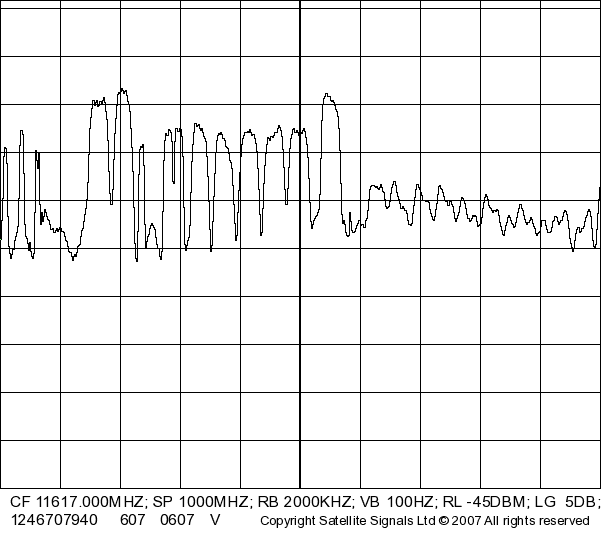 This is from W3A satellite at 7 east, vertical polarisation. If you want to find W6 satellite at 21.5 east, you need to repoint the antenna 9.5 deg higher up and 17 deg to the left. References: Dish pointing in Iraq On-line satellite spectrum analyser (in the UK) Best regards, Eric. |
|
Jul 9th, 2009 at 3:28pm
Ranging Stats ------------------------------------ Network Time: THU JUL 09 13:14:09 2009 ------------------------------------ State: Not Currently Ranging Previous Ranging Info [1] Previous Ranging Info [2] Previous Ranging Info [3] Previous Ranging Info [4] Previous Ranging Info [5] -------------------------------------------------------------------------------- Successful Rates | Unsuccessful Rates | Failed Rates | ----------------------+-----------------------+-----------------------+ 256k Turbo Code 1/2 256k Turbo Code 2/3 256k Turbo Code 4/5 -------------------------------------------------------------------------------- NOC-Sat Delay (AnE).......... 2538682 Remote-Sat Delay (BnD).... 2503576 Remote Distance To Sat (D)... 998695 SFNP Interval............. 3600000 Ranging ID................... 16 Network Ranged On (L:H:F). 021:E:1421 NOC ID....................... 0 -------------------------------------------------------------------------------- Rate......................... 256k Turbo Code 1/2 Available.................... 1 Ranging Reason............. 9 Ranging Sessions Required.... 5 Minimum EsNo............... 28 Target EsNo.................. 48 SwitchUp EsNo.............. 55 Initial Power Setting........ 0 Final Power Setting........ 158 Initial Received EsNo........ 125 Final Received EsNo........ 50 Initial Received C/No........ 666 Final Received C/No........ 591 Outroute SQF................. 76 Outroute C/No.............. 756 Initial Timing Offset........ 621 Final Timing Offset........ 467 Power Control Type........... PWM Estimated Rate............. No Coding Type.................. BCH Inroute Group ID Ranged.... 1 Timestamp.................... JUL 09 13:13:37 (GMT) 2009 Rate......................... 256k Turbo Code 2/3 Available.................... 1 Ranging Reason............. 0 Ranging Sessions Required.... 0 Minimum EsNo............... 54 Target EsNo.................. 64 SwitchUp EsNo.............. 0 Initial Power Setting........ 0 Final Power Setting........ 103 Initial Received EsNo........ 125 Final Received EsNo........ 64 Initial Received C/No........ 666 Final Received C/No........ 605 Outroute SQF................. 76 Outroute C/No.............. 756 Initial Timing Offset........ 0 Final Timing Offset........ 0 Power Control Type........... PWM Estimated Rate............. Yes Coding Type.................. BCH Inroute Group ID Ranged.... 1 Timestamp.................... JUL 09 13:13:38 (GMT) 2009 Rate......................... 256k Turbo Code 4/5 Available.................... 1 Ranging Reason............. 0 Ranging Sessions Required.... 0 Minimum EsNo............... 77 Target EsNo.................. 87 SwitchUp EsNo.............. 0 Initial Power Setting........ 0 Final Power Setting........ 74 Initial Received EsNo........ 125 Final Received EsNo........ 87 Initial Received C/No........ 666 Final Received C/No........ 628 Outroute SQF................. 76 Outroute C/No.............. 756 Initial Timing Offset........ 0 Final Timing Offset........ 0 Power Control Type........... PWM Estimated Rate............. Yes Coding Type.................. BCH Inroute Group ID Ranged.... 1 Timestamp.................... JUL 09 13:13:38 (GMT) 2009 General Stats ------------------------------------ Network Time: THU JUL 09 13:21:35 2009 ------------------------------------ --------- Allocated Inroute Message Statistics -------- Stream Messages ACK'd......... 1248170 Stream Messages NAK'd....... 3374 NonStream Messages ACK'd...... 9680 NonStream Messages NAK'd.... 700 Aloha Starts.................. 13036 Ranging Starts.............. 1 WakeUp Aloha Starts........... 0 DNCC Busy................... 0 Allocated Stream Bytes........ 227537688 Used Stream Bytes........... 79383999 ------------- General Transmit Statistics ----------- Tx Superframes Count.......... 486096 Tx Superframes Size......... 48147096 No Frame Information.......... 176 Not Sync'd to Network Timing 38 No Receive Demod Lock......... 21 No FLL Lock................. 609 No Transmit Synth Lock........ 0 Miscellaneous Problems...... 221 ----------------------+---------+----------+----------+----------+----------+ | CBR|Priority 0|Priority 1|Priority 2|Priority 3| ----------------------+---------+----------+----------+----------+----------+ Packets in AQM Queue 0| 2| 0| 0| 0| AQM Queue Size 0| 173| 0| 0| 0| Packets Received 0| 316043| 19778| 150275| 0| Bytes Received 0| 29509123| 3380055| 15558819| 0| Packets Sent and Acked 0| 315690| 19755| 150213| 0| Encoded Queue Flush 0| 40| 11| 22| 0| Latency > Thresh Drops 0| 175| 65| 122| 0| Pkts Latency > 2000 ms 0| 270| 340| 2895| 0| Pkts Latency > 10000 ms 0| 215| 66| 285| 0| Latency Last Value (ms) 0| 1080| 40| 550| 0| Latency High Water Mark 0| 59690| 59090| 58490| 0| ----------------------+---------+----------+----------+----------+----------+ |
|
Jul 9th, 2009 at 10:55pm
Regarding your problems I would suggest that you need to give far more attention to the accuracy of the pointing. Sorry to be blunt, but the skill and precision required in dish pointing is not that obvious. It is critical to get to the exact centre of the beam. In azimuth (sideways) the trick is to loosen both nuts by say 2 turns and gently swing the dish many times against each nut alternately, measuring all the time and adjusting one nut till both degraded readings are exactly the same. Then wind in both nuts by exactly the same number of turns and flats, so as to centre the dish. In elevation, mark one flat with felt tip pen. Then wind right across the beam peak from a degraded measured value below to the same degraded value above. Then half count the turns and flats back to the centre. The receive beam has a broad rounded and rather vague peak and you can't just try for the max value, you need to get half way between the clearly defined steeper sides of the beam. The transmit beam is narrower than the receive beam so any error in the receive beam centering and your transmit quality will fail. Best regards, Eric. |
|
Email me:eric@satsig.net |