|
|

| SatSig Topics Index › iDirect Forum: hubs and terminals › Weak SNR Idirect 3100 |
SatSig topic: Weak SNR Idirect 3100(Read 8991 times) |
|
Aug 1st, 2009 at 4:10am
Before getting bandwidth from my providers that is constellation.net, i informed them that i wanted to run 10 machines and two voip lines and they made a quotation to me and we agreed on 256/256 BIR for the internet surfing and 32/32 CIR to do voip. I use Idirect 3100 router/modem My main problem with my provider is that on most occasions when a customer picks up the phone to make a call internet browsing freezes. Data continues to flow for those surfing only when the call is dropped. However, on Sundays the lines are ok. Again on certain days or even weeks the lines are ok and and freezing stuff returns again to haunt us. Sometimes it is very severe. My providers tell me that my Rx SNR reading is good but that my Tx SNR is bad and fluctuates on the downward side getting to below 4.4 when the minimum should be 7. We have troubleshooted in every manner; swapping cables b/w the tx and rx, changing the BUC and connectors with the same result. I have also reformatted the whole cafe, bought a new switch and router to no avail. Please I do need urgent help as this badly affecting my business. |
|
Aug 1st, 2009 at 10:19am
Anyway, to address the low and fluctuating transmit S/N. Possible reasons and cures: Fluctuations could be due to loose antenna swinging in the wind. Gently push/pull the dish all ways. It should be "rock solid". Fluctuations could be due to atmospheric scintillation if you are operating at a low elevation angle under 10 deg. Do you see variations in your receive S/N ? There is not much that can be done about this other then to find another satellite above 10 deg elevation angle. Could be due to poor F type plug connection. Try waggling the cables at the modem and BUC ends. Does this cause any changes in the transmit quality. Since this needs cooperation with Constellation you may not be able to do this test. Make sure the wire centre pin at the F type plug is long enough. The pin should stick out 1-2mm proud of the rim of the plug. The cable braid/sheath should make good contact with the outer of the F connector. When screwed in, the pin should go into the hole and the cable should not get pushed back. There should be no corrosion at all. Even slight damp will cause corrosion in a few weeks a long way back down inside the cable. Note that the BUC needs DC power from the modem so low DC resistance is important. A copper centre wire is good. Copper plated steel centre wire not suitable. Copper foil sheath preferred to aluminium film. Antenna mispointed. The transmit beam is narrower than the receive beam so, if the signal from the satellite is particularly strong, you may have a good enough receive signal (but not the peak) and a poor transmit signal (well of the peak). If you are on the steep side slope of the beam, your signal level will vary daily and weekly with slight north/south and east/west satellite movement. This might explain outages at certain times of day (north-south) and over weeks as the satellite drifts east-west. 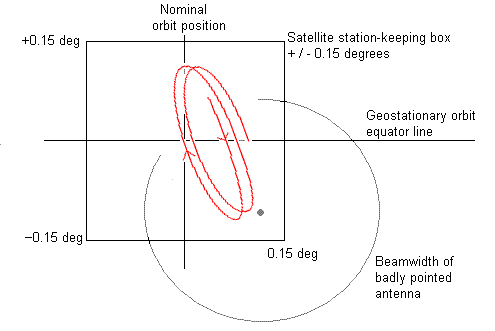 . .Peak up by adjusting nuts in 1/6th turn increments. Put to the centre by halving the distance between exactly equal degraded signals either side, as the top centre of the receive beam is rounded and indistinct. Low DC supply voltage to the BUC. It is important that the BUC cable and F connectors have low DC resistance. Good contacts and no corrosion - see above. Wrong modem output level set up. The output level from the modem is adjusted by an automatic process to try to keep the S/N receive quality at the teleport hub at 7dB (in your case). This will only work properly if correctly configured at the time of commissioning. The NOC need to test your transmit path by monitoring your transmit carrier level while adjusting your modem output level. Using unmodulated CW carrier they increase your modem output level from a very low in 1 dB steps and plot the BUC output level. When it stops going up in 1 dB steps the gain is becoming compressed and they need to back off a bit. This establishes the "P-1dB" point of your BUC, i.e. its maximum rated power. The value of the modem output power for this must be recorded and set in the hub database. This value will never be exceeded in service. If the modulation is now put back on, the S/N at the hub may well be far too high, like 11 dB. The system will now automatically reduce your output power to the correct level to get 7dB at the hub. In this example you have a 4 dB uplink power control margin, so during heavy rain your BUC power will increase up to 4 dB to keep the S/N=7 at the hub. If your "P-1dB" has been set wrong then your modem output level can be too high and this will cause distortion and interference to other sites transmitting on adjacent frequencies. The symptom is a lowering, or unchanging S/N with increasing BUC input power. Ask Constellation to read the above paragraph about your BUC power setting and comment on it. They might also check to see if any other sites have low or varying S/N at the hub. Since your traffic flow freezing probem can be specifically initiated by making phone calls is is possible that it has nothing to do with your low transmit S/N (as above), but is related to IP routing, congestion, QoS configuration etc. I hope others, with expertise in that area, will be able to comment here about this. Best regards, Eric. |
|
Aug 1st, 2009 at 3:18pm
Am not below 10 degrees elevation. We have repeatedly changed connectors and have swapped the Rx and tx cables with their connectors with the same result. We have looked into the pointing of the dish and tested the current behind the modem at the tx end and at the BUC end and all is ok as per constellation recommendation. I think as you say constellation should read your post and see how they can help with the suggestions you put forward. Thanks again and again. |
|
Aug 1st, 2009 at 5:52pm
I wonder what voice coding method, samples per packet etc are used when calls are made ? The bit rate needed for a VoIP call may vary according to the configurations in the phone handset itself, your iDirect modem, the iDirect hub at the teleport, VoIP gateway, SIP server, the far end phone. The bit rate may not be the same for all calls. Read more https://www.cisco.com/en/US/tech/tk652/tk698/technologies_tech_note09186a0080094... The above Cisco document gives examples of 31.5 to 87 kbit/s. Note that the lowest ethernet bit rate is not the same as the voice coding rate (e.g. 8kbit/s for G729), due to packet encapsulation (i.e. the added packet header). I know that in CDM570L satellite links we can get G729a 8k VoIP WAN bandwidth down to 10.8 kbit/s, in both directions, using IP/UDP/RTP header compression (for maximum of 64 simultaneous calls), compared with 32kbit/s without header compression. I believe the iDirect has a similar compression capability for VoIP traffic. Maybe your problem is due to the phones sometimes going into high bandwidth mode. Does the coding/bandwidth vary from one call to the next according to the number dialed? Can your customers fiddle with the handset code type or samples per packet settings. If the far end phone operates at G711 64kbit/s then some conversion is needed at the teleport to get the bit rate down to say 32 or 10.8 kbit/s over the satellite section. Do Constellation provide the VoIP gateway or bit rate conversion point at their teleport ? I am no expert on this; just someone who has experienced similar problems in the past. Some Cisco routers contain an array of fast DSP chips to convert phone calls from one code to another. You need advice from iDirect and VoIP experts. Please help anyone with advice ... Best regards, Eric. |
|
Aug 1st, 2009 at 7:03pm
|
|
Aug 1st, 2009 at 9:04pm
As for http waiting behind VOIP, does your provider utilize Group QoS? If so, to fully evaluate the possibilities, we would need to take a look at your options file (please do not disclose passwords, or IPs, please blank the appropriate portions out if you post it in here). The problem with viewing the options file only, is the fact that it only provides us with the traffic types, and their queuing priorities. It does not provide us with network level situational awareness which is needed for a proper assessment. If your provider said that you are using 18K of upstream BW for a voice call, it sounds like they are actively looking into your issue (which is good, they have taken an interest in it to the point where they are evaluating your voice streams). Hopefully they are looking hard at upstream contention, as well as time slot utilization at the time you are experiencing the issue (if not, ensure that you do your best to re-create the problem, so they can take a look at it). Have you considered putting ethereal or wireshark in line and sniff the wire prior to the iDirect box? It doesnt sound like you are fraging as that voice call would likely consume a lot more than 18kbps. However, I would still consider using wireshark to take a harmless look at those packets (specifically, their sequence). I would also take a look at CPU cycle on the iDirect at the time you are observing a problem....if anything to ensure that iDirect box is not being overwhelmed. It is unlikely, but harmless to check via a quick telnet session. For all you know, there could be a virus on one of your clients and the box is being overwhelmed. You can check that duty from telnet or console. My best guess (without situational awareness of the network and Group QoS policies), it sounds to me that your providers Group QoS is in need of some fine tuning/tweaking. Just a hunch, but I am willing to bet that file transfers (tcp) will wait behind those VOIP calls...just like http. If they ARE using Group QoS, have them check your profiles to determine why http is coming to a standstill while those small UDP voice packets are crossing the wire. Granted, 256k isnt much residual BW when the codecs are lit, but it shouldnt be stopping altogether. Something is certainly amiss, especially if there is residual BW remaining on your BIR/CIRs. |
|
Aug 1st, 2009 at 11:09pm
2. I note the Linksys PAP2 works in conjunction with a VoIP service provider, possibly with a Cisco VoIP gateway. Is Constellation the service provider ? Or does the traffic go via some other company?. Does the service provider know that low bit rate voice is essential on all speech towards the VSAT site ? 3. Do make sure you have long and cryptic passwords on your router and the PAP2. Best regards, Eric. |
|
Aug 2nd, 2009 at 1:07pm
However, on most sundays the phones do not affect http packets and delay them. Today the phones do not disturb internet browsing. This freezing of bandwidth for surfing does occur even when you lift the phone to make a call at the times that it does occur. I am baffled why it choses some days or certain hours to freeze up internet surfing. Why does it not occur the other way round that is internet surfing makes telephone calls impossible? I am looking for the options file to paste. Maybe help might come from this forum and constellation whom i have copied this link to follow up. Thanks from the bottom of my heart. |
|
Aug 2nd, 2009 at 1:16pm
|
|
Aug 2nd, 2009 at 1:51pm
|
|
Aug 3rd, 2009 at 10:16am
255.255.255.252 give 1 useable IP address e.g. .2 255.255.255.248 give 5 useable IP addresses e.g. .2 - .6 255.255.255.240 give 13 useable IP addresses e.g. .2 - .14 255.255.255.224 give 29 useable IP addresses e.g. .2 - .30 255.255.255.0 give 253 useable IP addresses e.g. .2 - .254 Note that in a typical LAN, .0 is the network name, .1 is the gateway and the last one (.3, .7, .15 or .31 above) is the broadcast IP address. The total number of IPs is 4, 8, 16, 32 or 256. If all the above are private IP address space then Constellation needs to port forward a public IP address at their teleport end to your PAP2 device IP address, so you can receive incoming phone calls. Have you tried using the 15 port switch only and leaving out the two 4 port switches ?. I don't have any info about these "switches". If the 4 port devices are in fact hubs (not switches) then note that any traffic gets broadcast on all ports causing possible congestion. Also it is advised to have all devices either at 10 Mbit/s or 100 Mbit/s but not mixed. If your 15 port switch has a management interface it may be possible to use one port as a monitor port and set it to bridge any other port, allowing you to put a wireshark PC on it and monitor the traffic from any PC or the PAP2 device. It would be interesting to find out exactly what happens when a phone is picked up. VoIP service providers often provide configuration set up instructions for PAP2 devices (google for PAP2 configuration). Has actionvoip.com provided set up instructions ?. Please do not mention public IP addresses here and make sure you have highly complex and secret passwords on the iDirect modem and the PAP2. Constellation's web site has much information: https://www.constellationnetcorp.com/Downloads/ https://www.constellationnetcorp.com/Downloads/VoIP%20over%20Satellite.pdf Best regards, Eric. |
|
Aug 3rd, 2009 at 1:04pm
The symptoms regarding the calls stopping all other traffic sounds very much like a problem with the type of queuing used in your QoS profile. The current settings give Primary preference to traffic to/from ...31, ...32, and ...34 labelled VoIP. Next in order of preference is ...33 labelled Billing Software, then all tcp traffic to/from port 80 and 443 labelled HTTP. Finally there are queues for TCP, UDP and Other traffic. There are two types of queuing used in your profile: Priority Queuing and Cost Based Weighted Fair Queuing. The VoIP, Billing Software and HTTP queues use Prioity Queues and the rest use CBWFQ. The iDirect system delivers the Prioirity Queues first and the CBWFQ queues second. The problem arises when the VoIP queue comes close to using all the available bandwidth. The modem and hub will not attempt to deliver any other traffic until the VoIP queue is emptied. There is a fine balance here in tuning the QoS for your link. If you move all the queues to CBWFQ and give all the VoIP traffic a lower cost than the rest of the traffic there is a risk that when you have a large demand for http traffic at the same time the modem will not allocate enough bandwidth to maintain the call. The NetFlow data we have collected for your link shows traffic matching your VoIP profile and with an origin/destination of xxx.xxx.xxx.0/24 using up large portions of your bandwidth allocation. What codec does your VoIP system use? If your VoIP calls are using more than 32kbps of bandwidth then the active call is using all of your link’s CIR and a portion of whatever burstable bandwidth is available. When your link is active it is using all of its MIR. [ IP address overwritten xxx.xxx.xxx. above, by forum admin ] If your VoIP phones are using more than 32kbps per call you will have to run Priority Queuing to make the call work and the browsing traffic will suffer. If your VoIP phones are using less than 32kbps per call then you can switch to CBWFQ and you should be able to get the phone and browsing to coexist. We can change your QoS to only use CBWFQ for all QoS queues fairly easily; it requires a simple reset of your modem. It will be up to you to ensure that your VoIP phones’ bandwidth requirement suits the CIR available on your link. I recommend we address the VoIP/QoS issue first before troubleshooting the midday slowness. What I suspect is that during the times you mentioned the demand on the shared bandwidth on the NSS7 networks are at their peak. Your link shows very high throughput when it is active, normally sustaining its Maximum Information Rate. This means you are getting 100% of your shared allocation of bandwidth. If your site is trying to sustain 256kbps of throughput during the peak times it’s likely you are experiencing slow browsing response times because your link is completely saturated with traffic. TO WHICH I MADE THE REPLY FOUND BELOW I have now verified that Pap 2 linksys ATA is configured to use G723 codec. I have removed one of the phones attached to the ATA and I am using just one phone for now at this hour. This phone is at ip ...32. It is almost mid day here. I will pray that you get my stats. I have only one phone and 10 computers on at this moment. The phones are very important to my business. I think we should keep some of the priority queues (that is ...33, ...32, ...34) and observe the bandwidth. Meanwhile I will kindly ask you to change the priority queue at ip ...31 to use CBWFQ. Please you may go ahead and do so resetting the modem right away. I will use this ip for the phones to test it whether it will work - that is if there will be no problem if the computers for surfing and and the phone are all set to use CBWFQ. The computers for surfing are at the ip ...30 that uses CBWFQ. Today Internet surfing was fast from 9.00am up to 11.am. However calls on the one phone caused the Internet surfing to be slow but not freeze. It is thus clear that there are two issues; the priority queuing and slowness from mid-day to about 1600hrs Central African Time. I will pray that you look for ways to handle the problem of midday slowness right away. Thanks again. |
|
Aug 3rd, 2009 at 2:09pm
There should be about 150-200k of (residual) BW available for http (even factoring in the overhead). Granted, the 256 BIR is not garanteed BW, so you are "contending" for that BW with other nodes, but http should not be coming to a standstill entirely. I bet if you were to sniff that wire just prior to the iDirect you wont find any http packets crossing the wire when the voice codecs are lit. You really should consider a router just prior to the iDirect unit to mark/shape that traffic (QoS policy) for a proper handoff to the iDirect - which in turn demands BW for it. I would also be curious what priority VoIP is, and what priority http is. The fact that one call is disrupting HTTP leads me to beleive that your http packets are getting out of sequence. That, or their Group QoS (priority queues) are in need of a relook. |
|
Aug 3rd, 2009 at 3:36pm
|
|
Aug 3rd, 2009 at 6:15pm
I am sure you are frustrated, but be thankful that you have a provider that has taken a personal interest in your situation (case in point: their lengthy reply). That type of provider is hard to find these days. |
|
Email me:eric@satsig.net |