|
|

| SatSig Topics Index › HughesNet and Hughes HX VSATs › Hughes HN7000S Dish Alignment Help |
SatSig topic: Hughes HN7000S Dish Alignment Help(Read 12160 times) |
|
Sep 18th, 2010 at 9:01am
10 East. The service provider i am using is ATS Iraq. Here are the parameters given to me: Satellite Longitude 10 Degrees East Satellite Frequency 16040 Symbol Rate 15000000 LNB 22KHz Switch On DVB Mode DVB S2 ACM Frequency Band KU/QPSK Receive Pol Vertical Transmit Pol Horizontal VSAT LAT Degrees 34 98 VSAT LAT Minutes 59.1 VSAT LAT Hemisphere NORTH VSAT LONG Degrees 44.11 VSAT LONG Minutes 6.8 VSAT LONG Hemisphere EAST Dish azimuth (deg E relative to true north) 229.75 Dish azimuth (deg E relative to magnetic north) 225.35 Dish elevation (deg) 35.66 Slant range (km) 38126.33 Polarisation tilt (deg) 38.71 Polar mount main axis angle (deg) 35.66 Polar mount dish offset tilt (deg) 4.96 Any help that can be given me would be great. Thank You. Sgt Patrick Doran E3/15 INF |
|
Sep 18th, 2010 at 9:47am
|
|
Sep 18th, 2010 at 11:20am
|
|
Sep 18th, 2010 at 12:08pm
Next is the VSAT LAT and LONG data. The HN7000S does require the user to enter his Lat/Lon in decimal format, but decimal degrees only. The fact you list decimal degrees AND decimal minutes puts the accuracy of the Az/EL/Pol numbers in question. Just using the Wikipedia coordinates for Ramadi, I calculate your pointing angles to be 225.8 Az (mag), 37.3 El, 39.8 Pol. Unless you have an offset dish mount that is, which requires a further adjustment to the elevation number. The offset in degrees of your dish mount (if any) should be listed in the hardware manual as well. So for the moment, let's approach this from an antenna pointing viewpoint. Please confirm in your hardware manual whether or not the 22 Khz should be ON or OFF. Then determine what - if any - the offset (in degrees) is for your dish mount. Finally, clarify your geographic coordinates into xx.xxx degree format (turn minutes into decimal degrees). //greg// |
|
Sep 18th, 2010 at 1:58pm
If it is LNB P/N 1500287-0001 (NJR2784HH) then it has a fixed local oscillator frequency of 10 GHz and the 22 kHz tone from the modem is not required. Ref: https://mc.njr.co.jp/eng/products/vsat/ku-lnb/dro900.html If you don't have the HN7000S installation manual then note this important warning: Do not interfere with the two coax cables or the multiway low voltage connector between the power supply and the modem unless the mains wall switch is OFF. Always power OFF at the mains wall switch before working on the coax cables. During your initial satellite finding and pointing activities it is suggested that you have only one coax cable connected from the LNB to the modem receive input. Useful references: HN7000S-HN7700S-Remote-Terminal-Installation-Guide ( 9 Mbytes ) HN7000S-HN7700S-Remote-Terminal-User-Guide ( 5 Mbytes ) HN7000S-Quick-Start-Guide ( 307k bytes ) If you have a simple discrete LNB module (like NJR2784) on a filter sidearm then for vertical receive polarisation start with the LNB sticking out sideways on the left, as viewed with you standing behind the dish and facing forwards towards the satellite in the sky. Then apply the +ve polarisation adjustment amount by turning it clockwise by the calculated amount, still as viewed with you standing behind the dish and facing forwards towards the satellite in the sky. Best regards, Eric. |
|
Sep 18th, 2010 at 5:09pm
|
|
Sep 18th, 2010 at 6:09pm
Alternatively, edit the pictures to make them small file sizes (i.e. crop and save in low jpg resolution); upload to a public server somewhere and insert into your messge like so: {img}https://www.example.com/images/dish-picture-1.jpg{/img}; Use square brackets not squiggly ones ! Best regards, Eric. |
|
Sep 18th, 2010 at 11:48pm
For vertical receive polarisation start with the LNB sticking out sideways on the left, as viewed with you standing behind the dish and facing forwards towards the satellite in the sky. Then apply the +ve polarisation adjustment amount by turning it clockwise by the calculated amount, still as viewed with you standing behind the dish and facing forwards towards the satellite in the sky. 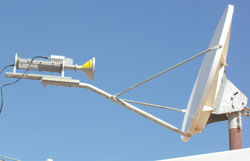 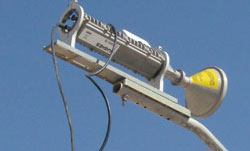 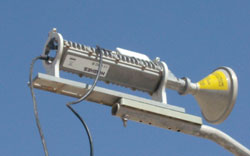 These images above show the wrong polarisation setting. You have started with the LNB filter arm upwards (Horizontal polarisation) and then applied approx +45 deg clockwise adjustment. Instead, for Vertical receive polarisation and an adjustment of +39 deg, you need to start with the LNB filter arm to the left and then turn it +39 deg clockwise. Remember always viewed from behind the dish and facing forwards towards the satellite in the sky. It is the amount of adjustment that matters, not the actual scale reading, which may go backwards from 90 deg. e.g. a 51 deg marking is 39 deg back from 90 For the W2A satellite it may help to set the polarisation a further +3 deg clockwise. The picture below from page https://www.satsig.net/maps/satellite-dish-pointing-iraq.htm shows you the pointing angles, the blue azimuth line towards nearby landmarks or buildings (increase the scale and go to your exact location) plus a picture of what your LNB should look like - viewed with you standing behind the dish and facing towards the feed and the satellite in the sky. 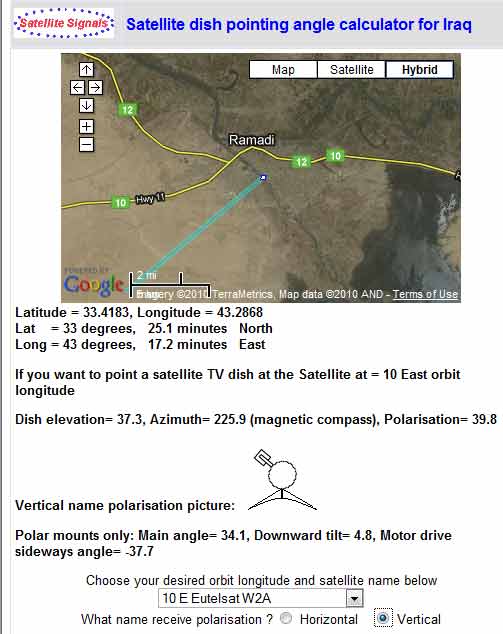 The beam elevation angle is about 39 deg, which is about right. It helps if the pole is upright and the clamps tight. If the clamps are a little loose try setting a beam elevation angle on the scale a couple of degrees higher than calculated. To find the satellite observe the SQF reading on the PC screen and the RX LED on the modem. Swing the dish boldly till you get a response. If nothing on the first swing alter the elevation in 1 or 2 deg steps. Once you find any satellite note the position and peak up. If the maximum is 29 you have the wrong satellite or have put the wrong configuration (frequency or symbol rate). Expect a figure like 91. Peak up to the maximum. Once you have found a satellite, note that the adjacent satellites alonmg the orbit will be to the upper left and lower right, as viewed towards the sky. wxw Best regards, Eric. |
|
Sep 19th, 2010 at 12:58am
Typically you set the EL and the POL, then sweep right and left (AZ) in small increments until the modem finds the satellite/transponder that you've set into the parameters. Then you fine tune the EL, then go back and fine tune the AZ. You may have to do this more than once. If you were in the states, you'd then optimize the POL by using the modem ACP capability. But I doubt you get that option from the Iraqi provider. You can try to tweak the POL to see if it increases the signal strength any. But don't hold your breath. Alternatively, contact the provider and ask if they're equipped to assist you optimize crosspol. If yes, it's a real time process (it's done over the phone). They'd have to observe your TX signal on a spectrum analyzer while you adjust the POL at your end. //greg// |
|
Email me:eric@satsig.net |