|
|

| SatSig Topics Index › Dish pointing and alignment › iDirect alignment to W6 Satellite |
SatSig topic: iDirect alignment to W6 Satellite(Read 13663 times) |
|
Oct 5th, 2010 at 9:14am
I am having issues getting a good signal to W6 satellite. I have already installed the opt file given by my provider. Here goes the settings I was told to put Dish Elevation: 45.13 Dish Azimuth (deg east relative to magnetic north: 218.01 Polarisation tilt: 55.26 I have both cables connected to the dish, but only the RX from the LNB connected to the modem. While trying to lock on a signal, we are only able to find a signal at 195 Azimuth, which I think is the W3 satellite. That signal will not go any higher than 7 on the display. I also have the lnb with with writing facing to the side. I took some pics, but am unsure how to display them here. |
|
Oct 5th, 2010 at 10:08am
Send images to me eric@satsig.net and I will put them here later this afternoon. |
|
Oct 5th, 2010 at 11:36am
|
|
Oct 5th, 2010 at 4:45pm
you can find your exact antenna location and the blue line will show you the azimuth (sideways) compass bearing to point the dish. Note how the blue line compares with the wall of your building, road etc. This is approximate location map: 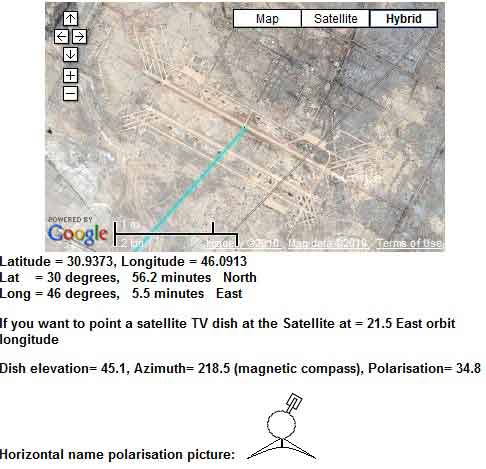 Note the polarisation adjustment needed is +34.8 clockwise (yours is 90 - 34.8 = 55.2 ). You have a dish with a giant polarisation scale on the back of the dish, so maybe you have to start with the feed arm at the bottom and then turn it +34.8 deg clockwise, while facing towards the satellite in the sky. Alternatively, maybe you have to start with the feed arm at the right hand side (initially turn the dish 90 deg anticlockwise as viewed from the back) and then turn it +34.8 deg clockwise, while facing towards the satellite in the sky. Which of the above applies depends on your wanted polarisation NAME and also the type of LNB you have. If your LNB is a simple discrete box, like NJR2784H, with 4 screws and square flange, attached to a filter side arm then: Arm upwards = horizontal polarisation start psotion. Arm sideways = vertical polarisation start position. If your LNB is an integrated Universal LNB/OMT with PN 1501882-0002 then the polarisation direction is the same as the F connector. Connector upwards = vertical polarisation start position. Connector sideways = horizontal polarisation start position. Whatever the start position, you then need to apply the +34.8 clockwise adjustment. I guess the 55.26 deg was intended to be applied anticlockwise from a different quadrant starting position. Once you detect any satellite at all, peak up and note the position (measure/mark the screw adjusters). The other satellites are all in a line from higher up at south and lower down at south west. Move diagonally to get from one satellite to the next, till your modem receiver locks onto the wanted carrier. The next image, below, shows the beam elevation angle set to 48 deg (you need 45.1 deg). The metal plate behind the dish is at right angles to the beam direction. 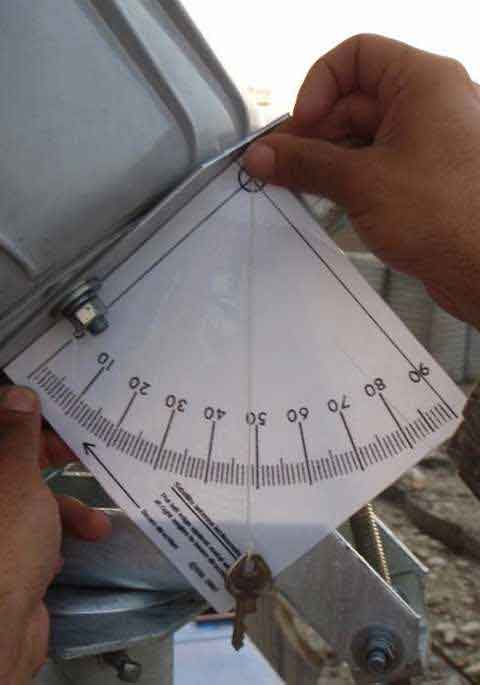 You can make your own inclinometer like this by printing out page https://www.satsig.net/pointing/how-to-make-inclinometer.htm wxw Best regards, Eric. |
|
Oct 5th, 2010 at 6:25pm
I actually was not told what NAME polarisation to use. I'm sure you must have it in the satellite parameters given to you by the provider. But perhaps you're confusing signal polarization with the dish POL angle. In order to maximize transmitter isolation and minimize phase distortion, your dish (or TRIA) must be rotated commensurate with the position of the satellite in the orbital arc. That's done either by rotating the dish or the TRIA to the calculated POL angle. Signal polarization on the other hand, is either horizontal or vertical - info your provider should have already given you. You then select this option on the satellite parameter page of the modem's Installation/Setup section. Go to https://192.168.0.1/fs/advanced/advanced.html , left hand column bottom. Click Installation, then Setup, then Registration. A few pages in you'll find the satellite parameters page. //greg// |
|
Oct 6th, 2010 at 9:45am
Vertical is parallel with the earth's axis. Horizontal is parallel with the equator at the sub satellite point. For dish polarisation, start by setting the nominal polarisation, as above, then apply the adjustment amount between -90 deg anti-clockwise and +90 deg clockwise, as viewed with you standing behind the dish and facing towards the satellite in the sky. When your site is commissioned by the hub they may ask you to make a few degrees final adjustment of polarisation, as the cross-pol isolation null is very narrow. 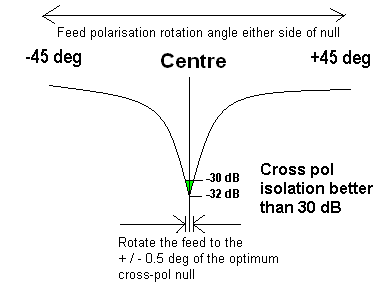 If you are in the northern hemisphere then the satellite due south of you (high up) needs no adjustment. Lower down satellites, to the south east: anticlockwise and lower down satellites, to the south west: clockwise. Please say what model number is your LNB and what make of modem you have - iDirect or Hughes HX ? Best regards, Eric. |
|
Oct 7th, 2010 at 1:15pm
============== Eric writes ... Here are the pictures together with my comments. 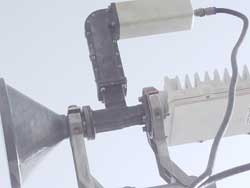 Picture above seems to show filter side arm and LNB approx straight up - this is Horizontal polarisation starting position. 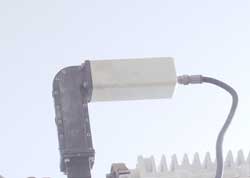 Picture above seems to show filter side arm and LNB approx straight up - this is Horizontal polarisation starting position. 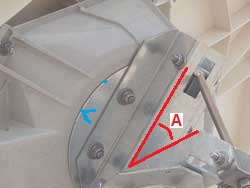 Picture above seems to show a clockwise polarisation amount applied. I can't see the scale reading at the blue ^ mark. The beam direction is at right angkles to the polarisation plate - so beam elevation angle = 90 - A deg. If a photo is taken from an exact side view it will show this angle accurately. 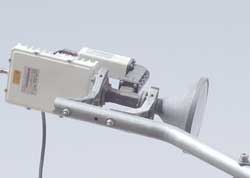 Picture above seems to show a clockwise polarisation amount applied. The filter side arm/LNB is directly away from the feed support arm and the whole assembly is then tilted to the right using the polarisation scale behind the dish. A photo taken from in front of the dish and towards the dish, with the camera level would make a measureable image. |
|
Oct 7th, 2010 at 1:46pm
(Latitude: 30.95N, Longitude: 46.07E) for W6: Dish elevation: 45.14° Dish azimuth (deg east relative to magnetic north): 218° Polarisation tilt: 55.26° I have to repoint the dish to that area and email back with a status update. |
|
Oct 7th, 2010 at 6:55pm
You may have to add about 3 deg clockwise to optimise the polarisation. Best regards, Eric. |
|
Oct 27th, 2010 at 8:35am
I have adjusted the dish as near perfect as I can. I am almost positive that it is the polarisation that is screwing us up but I am receiving 0 signal. We have confirmed the wires are correct and continuos and have succesfully setup the modem with the correct option file. I am roughly 200nm north of the original poster with the exact modem satellite. My pointing numbers are off by a few degrees of course. Up to now I have been adjusting the entire feed horn assembly to change adjust the "polarisation tilt." It appears from this exchange that I need to set the assembly to a vertical polarisation (which BW has not indicated either) and then rotate the dish. Any help would be greatly appreciated--as I'm sure the other guy did--I have a lot of angry customers. Thanks |
|
Oct 27th, 2010 at 11:35am
Assemble the feed system so the 505 is directly away from the feed arm. If you have a discrete small LNB receive module (e.g. NJR2784H) then have the LNB filter arm and LNB upwards. If you have an integrated universal LNB (Hughes PN 1501882-0002) then have the LNB cable connector pointed sideways. If you want to receive Horizontal polarisation rotate the whole dish using the giant polarisation scale so the feed support arm is at the bottom. If you want to receive Vertical polarisation rotate the whole dish using the giant polarisation scale so the feed support arm is at the side. Either side will do. If the polarisation adjustment required is positive (+) then turn the whole dish using the giant polarisation scale by that amount clockwise, viewed as standing behind the dish and facing forwards towards the satellite in the sky. The beam remains, approximately, pointed at the satellite as you rotate the giant polarisation scale. 2. If you have an older style dish, without giant polarisation scale at the back then ... If you want to receive Horizontal polarisation rotate the feed system so the LNB filter arm is upwards. If you want to receive Vertical polarisation rotate the feed system so the LNB filter arm is at one side. If the polarisation adjustment required is positive + then turn the polarisation by that amount clockwise, viewed as standing behind the dish and facing forwards towards the satellite in the sky. Notes: In all cases, having set the initial named polarisation you need to apply the adjustment amount. The spacing of the tick marks on the scale will guide you as to the amount of movement, but note that in some cases the scale numbers will read backwards from 90. Any + or - signs may or may not make sense. Don't worry, it is the direction; clockwise or anticlockwise that matters. If you have completed the polarisation setting process accurately, and you have the wrong name polarisation or just want to see what is on the opposite polarisation, just turn the polarisation by an amount of 90 deg. On Eutelsat satellites an extra 3 deg clockwise is suggested. Final adjustment of polarisation by a few deg either way may need to be done while following verbal instructuions from the hub. If you set the polarisation wrong by 45 deg, the level of the wanted signal and the level of the opposite polarisation signals will be the same. You will get loads of aggregated signal power but with a C/N=0 dB your demodulator will not lock up. Anyone with pictures of a good working iDirect on W6 please send pictures. Best regards, Eric. |
|
Oct 27th, 2010 at 8:21pm
I appreciate the fast reply and that information should be helpful. Unfortunately the named polarisation is what I have not been able to get from BW yet. If anyone knows what it is for W6 in Iraq that may work. Also of note. BW tells me it is a 60deg Polarisation when all the SAT calculation tools on the net say 30. To me that sounds like a mix up in +/- and horizontal or vertical. Which is why I know I need that info. Edit: From my above posting. I am not receiving exactly zero. The iSite program is showing between .3 and .39/.4 . We have gone through several broad sweeps with the elevation set. Thank you again for your help |
|
Oct 27th, 2010 at 10:50pm
If the 4 polarisation bolts are reasonably tight the card inclinometer illustrated above is accurate to 1 deg. If you use your own inclinometer instrument make sure you interpret the scale the right way round. If you lower the dish down the beam inclination approaches zero. The scale may read 134.9 or 45.1 deg, or 135.1 or 44.9 for example, depending on how you hold it to the plate. If in doubt, lower the dish elevation right down to the horizon and the reading is defined as zero elavation, regardless if the inclinometer reads 0, 90, 270 or 360. Then increase the elevation by an amount of 45, disregarding the numbers, but using the scale tick marks to count the amount of movement. This picture belows shows another way of setting the approx elevation. It assumes the base is level and the 4 polarisation nuts reasonably tight. 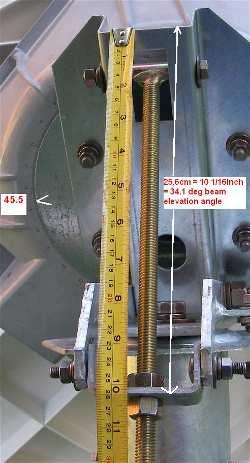 For 45 deg elevation set the distance to 22.5 cm Ref: https://www.satsig.net/bentley-walker/hx/setting-elevation-angle-prodelin-1point... wxw The two polarisations are exactly 90 apart from each other, both tilted 38 deg clockwise from vertical and horizontal, as viewed looking forwards, and 52 deg rotated anticlockwise if viewed from the front. The scale numbers will correspond to only one of these alternatives, and will depend where you start. Start with the polarisation either vertical or horizontal and then turn clockwise by an amount of 38 deg. If no good try the other one, turn it by 90 for the other polarisation. Regardless of polarisation setting you should find several satellites and be able to peak up on some satellite. Best regards, Eric. |
|
Oct 28th, 2010 at 1:55am
I will try to fine tune the elevation using the measuring link that you posted and I had also not considered the platform not being level, so I will try that. Regarding adjusting the polarisation. Should I rotate the entire dish or the Feed Horn assembly only? My simple mind doesn't understand the difference but it sounds like one is preferrable. Thanks |
|
Oct 28th, 2010 at 5:58am
In your email to me you said, regarding the cables, "I got a voltage reading on one and not the other". This may be the fault. There should be DC volts on both cables. It is often preferred to start with only the receive cable connected. The DC power may be turned off or on in the options file, for example: [ODU] odu_rx_dc_power = 1 odu_tx_dc_power = 1 odu_tx_10_mhz = 1 It is very unlikely that the file has one of the powers set to 0 Elevation: In the picture above, what is angle A (in red) ?. Note beam elevation angle = 90 - A deg Rotate the whole dish to set the polarisation using the large circular scale on the back of the wedge shaped plastic box. The 505 on the feed throat MUST always be exactly away from the feed support arm. Best regards, Eric. |
|
Email me:eric@satsig.net |