|
|

| SatSig Topics Index › Dish pointing and alignment › dish pointing angle for W6 |
SatSig topic: dish pointing angle for W6(Read 10397 times) |
|
Feb 24th, 2011 at 6:47am
Latitude (decimal): 32.6163 North Longitude (decimal): 65.8654 East Satellite: W6: 21.5° Dish elevation (deg): 29° Dish azimuth (deg east relative to magnetic north): 239° Polarisation angle (deg): 42° Clockwise rotation whilst standing in front of the feed assembly, facing the dish |
|
Feb 24th, 2011 at 7:40am
For 29 deg beam elevation set the distance to 28 cm. 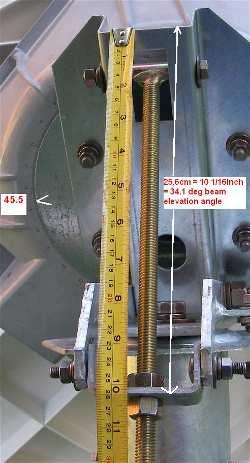 see https://www.satsig.net/bentley-walker/hx/setting-elevation-angle-prodelin-1point... This will work only if you have the base level and the big hold down bolt tight enough to allow azimuth movement but not enough to allow the dish to sag down. The same applies to the four polarisation bolts. If there is some sagging down aim higher up with say 27.6 cm. If you have an inclinometer apply it to the polarisation plate (rear surface of the wedge shaped plastic box). 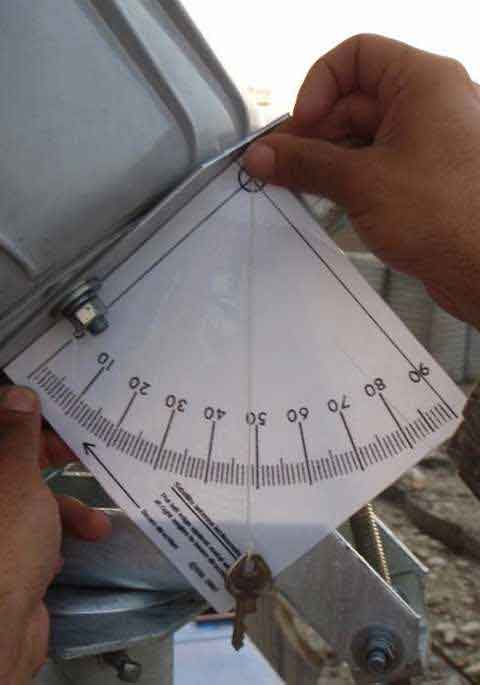 You can make your own inclinometer like this by printing out page https://www.satsig.net/pointing/how-to-make-inclinometer.htm You need to set 29.5 deg, not the 48 deg, as shown in the picture. Once you have set the elevation accurately swing the dish boldly sideways and stop when you find the satellite. The modem receive signal power will increase. If you can only get a max of 29 then your configuration needs attention, wrong polarisation or wrong satellite. If your wanted receive polarisation name is horizontal and you have universal LNB then start by turning the dish so that the LNB connector is sideways. It is likely that you assembled it like this. If your wanted receive polarisation name is vertical, turn the dish so that universal LNB connector is up or down. See pictures https://www.satsig.net/bentley-walker/hughes-hx-vsat-universal-lnb.htm The 505 on the feed throat must be directly away from the feed support arm. Best regards, Eric |
|
Feb 24th, 2011 at 8:15am
|
|
Feb 24th, 2011 at 8:46am
|
|
Feb 24th, 2011 at 9:28am
The reason with the satmeter does not say "W6 found" is probably due to: Misunderstanding about the type of LNB and its local oscillator frequency. Wrong polarisation. Wrong satellite. Wrong satmeter tuning. I suggest: Turn off the AC mains power at the wall switch. Connect up the power supply module to the HX modem. Connect one coax cable from the LNB to the modem receive RX socket. Note the information from Bentley Walker: Load the sbc.cfg file if told to do so. Input the manual commissioning information (tuning, symbol rate, IP addresses etc) into the modem screen. Check carefully that all the parameters are correct. The LNB type pull down menu content comes from the sbc.cfg file and is important. Look for the signal quality on the moden screen. If it is maxed out at 29 you are pointed at a very strong satellite power. The config, polarisation or satellite are wrong. Once correct the reading will go into the range 30 to 100. Peak up. 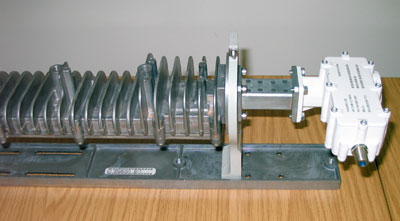 As shown, the transmit polarisation, from the BUC on the left, is vertical. Receive polarisation is Horizontal. The white part is the Hughes universal LNB/OMT PN 1501882-0002. Polarisation. There are two starting positions, one called horizonantal and one called vertical. The universal LNB connector needs to be pointing either sideways or up/down. You can alter this by turning the entire dish 90 deg either way. One position will be with the feed arm at the bottom, the other with the feed arm at the side. Having set a start position adjust the polarisation by: Turning the dish clockwise by an amount of +48 deg clockwise, as viewed standing behind the dish and facing forwards towards the satellite in the sky ( or, starting with the wrong starting position, by turning the dish 42 deg clockwise while standing in front of the dish and facing towards the dish, with your back facing the satellite. *) You may need to make some final small adjustment to the polarisation under verbal instruction from the hub. A maximum of +/- 5 deg final adjustment may be done at the feed yoke (that is what the 505 is for). The two possible final polarisation positions are at 90 deg from one another. One will work perfectly (SQF= peaked at about 92) the other will give just noise power (SQF= range about 10 to 29 max) Once you have peaked up, with say SQF=92, power off at the AC mains wall switch and connect a second coax cable from the modem TX out to the IFL connector on transmit BUC module at the dish. Turn the power on while taking to Bentley Walker, who will commission your site. Do not interfere with the antenna during this process. * I prefer to always to describe polarisation adjustment as (+) clockwise when facing forwards towards the satellite in the sky. If you are northern hemisphere and face due south, towards the equator, the satellite at the top of the orbit has its horizontal horizontal and its vertical vertical. If you look south west the satellites are lower down, tilted to the right, clockwise (+) . If you look south east the satellites are lower down, tilted to the left, anti-clockwise (-). Always think in terms of the amount of adjustment and the direction. Ignore scale numbers if they don't make sense, for example go backwards from 90. Best regards, Eric. |
|
Feb 24th, 2011 at 7:10pm
|
|
Feb 24th, 2011 at 8:51pm
To make best use of your daily traffic download and upload allowances read this: https://www.bentley-walker.com/documents/HX%20GoS%208.3.2010.pdf I would recommend: Download and install the Bentley Walker Turbo software on all your PCs and encourage users to use the lower image quality options and increase only when necessary to view higher resolution pictures. Enable local PC history caching; disable pop-ups, adverts etc. If you send or upload images or videos, do some editing locally first to minimise file sizes. Have good anti-virus software active and updated. Once a virus gets going it can quickly use up your traffic allowances by sending out vast number of emails etc. Note that traffic during the period 00:01 to 04:00 GMT does not count for your fair access policy (FAP) daily allowances, so use this period for the automatic download of software updates, packages etc. Make users aware that the following activities cause a heavy load on the system and may quickly use up your allowances. 1. Full-length movie downloads 2. Peer-to-peer (P2P) file sharing programs such as Napster, Kazaa or LimeWire 3. Continuous downloading or viewing streaming media content such as audio or video programming 4. Hosting of server devices such as email, FTP or Web servers 5. Hosting computer applications such as Web camera feeds 6. Automated computer to computer connections used for archiving of local computer content 7. Extensive downloading of Usenet Newsgroups (NNTP) 8. Use of BitTorrent applications 9. Simultaneous file downloads 10. Downloading or uploading large files (i.e., file sizes that are close in size to the download threshold of your service plan) If you do exceed your daily limits you will be slowed down but don't panic; you will be back up to full speed at the end of the day. Please email or speak with Bentley Walker if you need further advice. I'm independent of them and just trying to be helpful where I think I can offer some useful advice. Best regards, Eric. |
|
Email me:eric@satsig.net |