|
|

| SatSig Topics Index › TooWay and KA-SAT satellite › New KA-Sat (Tooway) - abnormally high latency |
SatSig topic: New KA-Sat (Tooway) - abnormally high latency(Read 9283 times) |
|
Jul 9th, 2011 at 6:55pm
I bought the new KA-Sat service from Toowaydirect (Avonline) for my mother, who lives in deepest Devon, a couple of weeks ago. The service hasn't lived up to my expectations to say the least, and I could do with a bit of advice. In short: slow browsing, fast downloads. I know this is typical of satellite connections, and I completely understand that the satellite has to send tonnes of tiny TCP/IP packets from earth to space and back every second. But nevertheless, the level of service seems extremely poor. For example, there are times when there's no throughput whatsoever. Nothing. Turning the modem off and back on does the trick - I've been visiting for about 24 hours and have cycled the power four times. This surely can't be right. Connecting a laptop directly to the modem by ethernet doesn't work either. It doesn't want to give out an IP. The main problem though is simply browsing. It can take 30 seconds or more for a page to load. I just tried hotukdeals.com (stop laughing!) and it sat there, waiting to load, for 35 seconds. Once it had done its DNS lookup, it came through quite quickly, but surely this can't be right? Couple of traceroutes below. The second hop is always a major problem. I'm also astonished that there is no way to login to the modem to check for signal status, or *any* diagnostic tools such as s/n ratios or even basic throughput stats. // inserted by forum admin... Please try typing 192.168.100.1 into the browser address bar to see modem status // Can anyone tell me if this is how it's meant to be? I thought the KA-Sat was meant to reduce latency, not average 700ms per request! Help much appreciated Will Traceroute has started… traceroute to hotukdeals.com (80.64.63.70), 64 hops max, 52 byte packets 1 hukdlbwb01.hotukdeals.com (80.64.63.70) 1.321 ms 1.151 ms 1.902 ms 2 * * * 3 * 10.130.130.9 (10.130.130.9) 2121.109 ms 1227.738 ms 4 10.130.130.163 (10.130.130.163) 887.069 ms 1277.235 ms 1331.562 ms 5 88-202-127-98.ip.skylogicnet.com (88.202.127.98 ) 2763.363 ms 1961.073 ms * 6 10.130.2.17 (10.130.2.17) 713.684 ms 716.678 ms 659.353 ms 7 10.130.2.42 (10.130.2.42) 774.262 ms 716.158 ms 716.861 ms 8 10.130.2.50 (10.130.2.50) 718.947 ms 714.264 ms 715.877 ms 9 10.130.1.22 (10.130.1.22) 818.568 ms 819.023 ms 716.849 ms 10 ae0-201.fra20.ip4.tinet.net (77.67.90.29) 1199.307 ms 716.523 ms 863.755 ms 11 * xe-7-1-0.lon25.ip4.tinet.net (89.149.185.193) 1963.161 ms 770.830 ms 12 * control-circle-gw.ip4.tinet.net (213.200.78.218 ) 1349.120 ms 819.591 ms 13 80.64.48.70.controlcircle.com (80.64.48.70) 716.363 ms 716.197 ms 716.827 ms 14 hukdlbwb01.hotukdeals.com (80.64.63.70) 716.760 ms 715.713 ms 716.912 ms Traceroute has started… traceroute: Warning: google.com has multiple addresses; using 209.85.148.99 traceroute to google.com (209.85.148.99), 64 hops max, 52 byte packets 1 fra07s07-in-f99.1e100.net (209.85.148.99) 8.937 ms 0.995 ms 0.893 ms 2 * * * 3 10.130.130.9 (10.130.130.9) 781.844 ms 694.204 ms 653.258 ms 4 10.130.130.163 (10.130.130.163) 677.058 ms 701.541 ms 1038.637 ms 5 88-202-127-98.ip.skylogicnet.com (88.202.127.98 ) 816.733 ms 714.473 ms 717.199 ms 6 10.130.2.17 (10.130.2.17) 718.106 ms 738.563 ms 687.542 ms 7 10.130.1.10 (10.130.1.10) 811.502 ms 714.610 ms 718.070 ms 8 10.130.2.45 (10.130.2.45) 715.341 ms 702.510 ms 716.832 ms 9 10.130.1.18 (10.130.1.18 ) 717.305 ms 698.314 ms 736.758 ms 10 google.franceix.net (193.105.232.2) 698.664 ms 701.673 ms 796.692 ms 11 72.14.238.228 (72.14.238.228 ) 715.512 ms 974.332 ms 716.967 ms 12 209.85.248.95 (209.85.248.95) 709.333 ms 716.031 ms 714.409 ms 13 209.85.254.41 (209.85.254.41) 705.821 ms 692.762 ms 209.85.254.57 (209.85.254.57) 680.225 ms 14 fra07s07-in-f99.1e100.net (209.85.148.99) 712.699 ms 686.663 ms 679.853 ms |
|
Jul 9th, 2011 at 8:06pm
You should not need to reboot the modem 4 times a day. Ask for explanation of the tracert. The initial step is odd. I've never seen the final destination shown at step 1. The next steps *** look wrong also. Not sure of the cause but this could be your PC interface configuration. Are you using the DNS servers recommended by Skylogic ? I wonder also why the routing starts in 10.x.x.x which is private address space, then goes to skylogic (italy) public address space and then back to private address space (4 hops) - bizarre. This need sorting out. Please report here when resolved and give the new tracert. Please would others with Tooway KA-SAT report on their tracert. Go to start, all programs, accessories, command prompt and type tracert hotukdeals.com in the black command prompt window. In the black window do right click, select all, return, and paste (control v) into this forum. KA-SAT cannot reduce latency - the latency of satellite links is fixed by the distance divided by the speed of light. KA-SAT has however significantly reduced the cost of VSAT satellite service for a given bit rate/Mbytes downloaded. The Tooway Surfbeam modem has in the past been severely deficient with regards to non-display of the download satellite carrier signal quality. All the information exists inside the modem and is regularly sent to the hub where graphical charts are accessible. Ask Avonline if they can get you this graphical output. e.g: 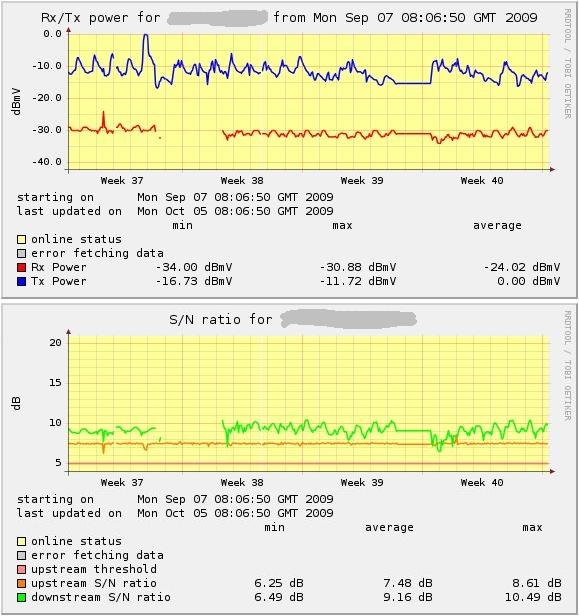 Best regards, Eric |
|
Jul 9th, 2011 at 9:22pm
Do those timings on the traceroute look poor to you? (1000ms, 600ms, etc) |
|
Jul 10th, 2011 at 9:32am
When web browsing via satellite expect an initial two to three seconds delay followed by the web page loading. The time taken for total page load could be in the order of 10 to 20 seconds or more, depending on the complexity of the page such as the number and size of embedded image files etc. Best regards, Eric. |
|
Jul 14th, 2011 at 9:27pm
Regards, Colin What a whinger! I'm only half as daft as I thought I was . I looked up tracert, used it and got this. Is it bad, if so, how bad? Tracing route to eu-fp.wa1.b.yahoo.com [87.248.112.181] over a maximum of 30 hops: 1 * * * Request timed out. 2 * * * Request timed out. 3 1730 ms 700 ms 698 ms 10.130.130.9 4 683 ms 680 ms 679 ms 10.130.130.163 5 678 ms 681 ms 677 ms 88-202-127-98.ip.skylogicnet.com [88.202.127.98] 6 676 ms 680 ms 679 ms 10.130.2.17 7 698 ms 718 ms 719 ms 10.130.1.10 8 717 ms 719 ms 720 ms 10.130.2.45 9 1838 ms 680 ms 679 ms 10.130.1.18 10 798 ms 709 ms 770 ms 195.81.51.225 11 687 ms 1114 ms 709 ms ae0-0.par-gar-score-1-re0.interoute.net [212.23.42.25] 12 708 ms 719 ms 719 ms ae1-0.lon-004-score-1-re0.interoute.net [212.23.42.22] 13 718 ms 720 ms 719 ms ge-1-1-0.pat1.the.yahoo.com [195.66.224.129] 14 727 ms 750 ms 729 ms so-0-0-0.pat1.irz.yahoo.com [66.196.65.33] 15 707 ms 717 ms 719 ms ae-1.msr1.ird.yahoo.com [66.196.67.231] 16 737 ms 710 ms 719 ms te-7-4.bas-b2.ird.yahoo.com [87.248.101.105] 17 736 ms 719 ms 720 ms ir1.fp.vip.ird.yahoo.com [87.248.112.181] Trace complete. Regards.... |
|
Jul 15th, 2011 at 5:38pm
try Pingplotter its a free (onemonth) package that will show path, and latency and plot it on a graph thats very easy to email. Ian H 2 weeks now on KA band and very happy - though the latency has slightly increased 600ms to 700ms |
|
Jul 17th, 2011 at 7:06pm
I have been using the new system since the start of July, self-installed. It replaced a system using the old Ka service. also self-installed, and in my opinion it works much better. It is hardly affected by rain at all. Link speeds are higher. Early on I did a 99MB download which averaged 750kBytes/second. Even without adding in the protocol overheads, that meets the advertised 6Mbps rate. I have not noticed any increase in latency - and that includes going via a compression proxy somewhere else on the planet. But I haven't bothered to measure it. In the last couple of days, the modem did show odd behaviour twice. Although the link was working fine, as shown on the modem status page, the internet was not there. At first I thought 'rain in Turin', but there was no rain there. A power cycle fixed it. I wonder if there was a firmware update, and this left it in limbo. It's working perfectly now, and we have some miserable weather at the moment. I was happy with the old system, and had terrible buyer-regret when I got this one. I have no regrets now. Regards, John |
|
Jul 17th, 2011 at 7:21pm
My modem status page gives its IP as a 10.x.x.x address. It seems static. The first hop contains most of the outgoing delay, and Skylogic adds little. Regards, John |
|
Jul 18th, 2011 at 11:54am
Tracing route to eu-fp.wa1.b.yahoo.com [87.248.112.181] over a maximum of 30 hops: 1 * * * Request timed out. 2 * * * Request timed out. 3 1730 ms 700 ms 698 ms 10.130.130.9 4 683 ms 680 ms 679 ms 10.130.130.163 5 678 ms 681 ms 677 ms 88-202-127-98.ip.skylogicnet.com [88.202.127.98] ...anyone? I always get the two time-outs at the start whichever site I trace, but I don't know their significance. While the tracert is running they each take about 10 seconds to time-out. Colin |
|
Jul 18th, 2011 at 5:27pm
Regarding further down the tracert I wonder why the routing leaves the private address space 10.130.xxx.xxx, goes to the public IP address 88-202-127-98.ip.skylogicnet.com and then back into the private address space 10.130.xxx.xxx before finally leaving into the public internet. I've never seen that before. Strange. Best regards, Eric. |
|
Jul 18th, 2011 at 6:50pm
Colin |
|
Jul 18th, 2011 at 8:06pm
I would ignore the tracert for the moment and do some tests on speed. Try some speed testers and tell us what results you get. My speed tester is https://www.satsig.net/speed-test/speed-tester.htm How long does it take to download a large pdf document ? Time it and calculate the speed. It may well be that your download speeds are entirely normal and unremarkable. If very slow then you may have been throttled due to excessive downloading recently. Ask your service provider for your FAP status. If you have not been throttled and are still very slow then there must be something the matter. Don't suffer in silence but tell your service provider so that such reports can be put together and maybe solved. wxw Best regards, Eric. |
|
Aug 21st, 2011 at 7:34pm
|
|
Email me:eric@satsig.net |