|
|

| SatSig Topics Index › TooWay and KA-SAT satellite › Tooway problems |
SatSig topic: Tooway problems(Read 22021 times) |
|
Mar 12th, 2012 at 11:18pm
Following disappointing performance, I have done some tests over the weekend. I have loaded 20 random web-sites over Saturday and Sunday and taken the average time it took to load a page. I also tested the download speed each time and then averaged that. The result is as follows: Average download speed. = 5.5mbps. Average time to load a page = 34 seconds I do not feel that 34 seconds to load a page is reasonable when the Tooway speed checker is showing 5.5mbps download speed. Also bear in mind that these tests were carried out on Saturday and Sunday when traffic would, I imagine be lighter as no schools/universities would be operating and many businesses closed. Today, with people back at school and businesses open, I am back to waiting up to a minute to download a page...even though the speed checker is showing a speed of 5.45mbps. What is also interesting is that although the 'official' Tooway speed check is giving consistently high download speeds, the speed tester that Twoway originally told me to use, which was speedtest.net, is giving me..... Ping = 2615mbps. Download = 0.83mbps and upload = 0.29mbps ...which, considering the time it takes to load a page, seem more realistic than what the Tooway tester says. Tooway's response is predictable....We've checked the system and it's OK. I have tried the system on both my computers, a friend's laptop and the local PC repair man brought up two laptops from his shop. The results were the same on all of them...slow....slow....painfully slow. I even went to the trouble of having my computer formatted and a new Windows installed, just so that PC problems were eliminated. Made no difference! Frankly, I wouldn't recommend Tooway to my worst enemy. Very disappointing. Here is tonight's speed test results at 00:15 from Tooway's 'official' speed tester at: https://speedprobe.skylogicnet.com/ Average Download Speed: 5262 kbps (657.8 KB/sec transfer rate) Average Upload Speed: 911 kbps (113.9 KB/sec transfer rate) Average Latency (Round Trip Time): 735 ms Jitter: 29 ms Packet Loss: 0% |
|
Mar 13th, 2012 at 7:31am
Have you tried downloading a large file? if so what was the download rate. Another issue could be that the dish is not aligned correctly. If it's even slightly off perfect it will effect the request/upload side as this is a narrower beam. If this was a self install try realigning, if not ask your installer to come and check it detailing the issues you have. Finally, can you take a screen shot of the routers diagnostics page (https://192.168.100.1 then click modem). This provides signal level for up and down as well as quality levels. Hope this helps |
|
Mar 13th, 2012 at 10:58am
With satellite you have to be aware of the latency. This does make pages load slower as, essentially, a webpage is various elements that load one after each other. Each element will have the latency attached to it. Surely, even with the latency I shouldn't be waiting as long as 34 seconds and in some cases, even 45-50 seconds?? I used to be working with a USB dongle and the speed was only 2mbps...and even that was faster than I have now.Have you tried downloading a large file? if so what was the download rate. Another issue could be that the dish is not aligned correctly. If it's even slightly off perfect it will effect the request/upload side as this is a narrower beam. If this was a self install try realigning, if not ask your installer to come and check it detailing the issues you have. Finally, can you take a screen shot of the routers diagnostics page (https://192.168.100.1 then click modem). This provides signal level for up and down as well as quality levels. Hope this helps I haven't tried downloading a large file. How do I do that? Regarding the dish alignment. That has crossed my mind but if the dish was out, would I be getting such high download readings from the Tooway tester? I will attempt to send a screen shot of the modem diagnostics page later today. Tooway sent me a new modem to try ans when I was installing it the 'signal strength was reading about 60%. |
|
Mar 13th, 2012 at 11:33am
Finally, can you take a screen shot of the routers diagnostics page (https://192.168.100.1 then click modem). This provides signal level for up and down as well as quality levels. Is this what you want?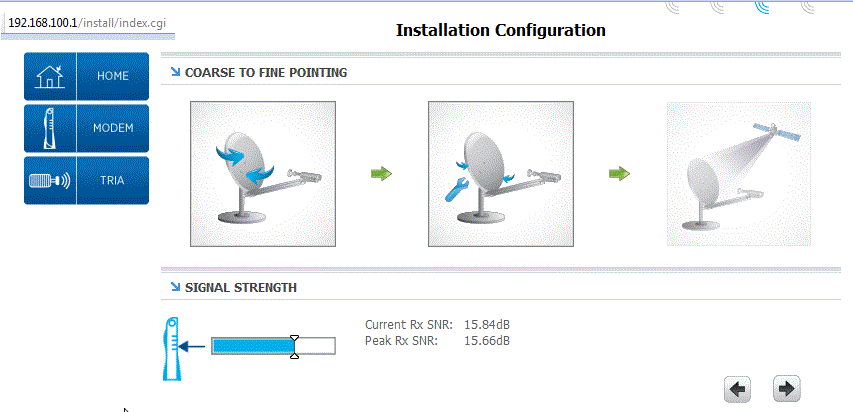 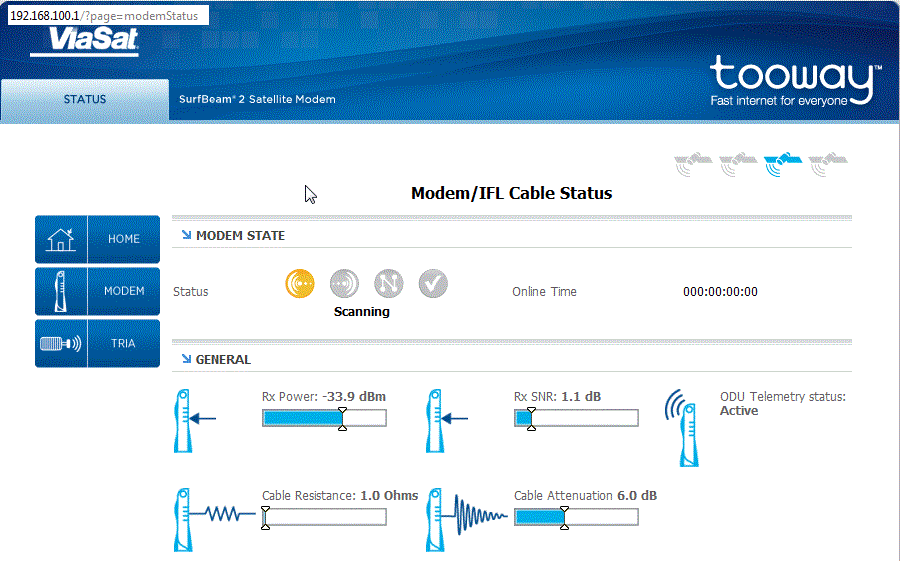
|
|
Mar 13th, 2012 at 3:14pm
The first screen shot shows excellent receive quality (15.6 - 15.8 dB). The second screen shot shows hardly any or no receive signal at all (1.1 dB is really bad). At this moment the modem was probably searching for a good carrier, trying different frequencies and polarisations and was not yet properly in service. The blue coloured satellite icon in the top right has not moved to position 4, which would happen when comissioning was successfully finished. I hope other people with experience with these screens may be able to offer more advice. 2. Satsig speed tester Your negative speed results with https://www.satsig.net/speed-test/speed-tester.htm certainly are strange and I have edited the page to try and remove this anomaly. If you use the speed tester don't repeat using "Refresh", "F5" or similar as subsequent tests will read from the local cached copy in your PC and give near infinite speed results. If you want to repeat the test, click on the link on the speed tester page and it "should" reload the page all the way from the satsig server. Note that your download speed at a Tooway site is very high, perhaps 60 Mbit/s. You are also receiving data intended for all the hundreds of other sites in your beam and the specific traffic that you have requested will come as a sequence of packets, somewhere in the 60 Mbit/s stream. If they are all close together you may get very high speed results. I think your tariff speed (e.g. "up to 10 Mbit/s") will be controlled by the hub router feeding into your outlink carrier and maybe averaged over 1 second. This will spread out your packets, giving others the chance to download their wanted traffic. Best regards, Eric. |
|
Mar 13th, 2012 at 6:06pm
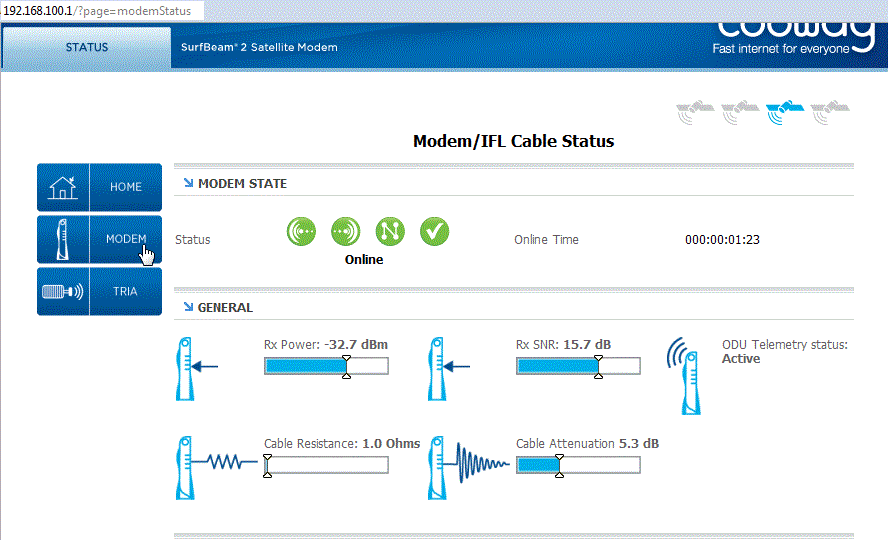 Above is the latest modem status but it does appear to change frequently and go back to just one green dot. Help and advice please !! Best regards, Eric. |
|
Mar 14th, 2012 at 12:10am
|
|
Mar 14th, 2012 at 6:36am
Definitely no trees or any other obstructions. I was considering that the dish could have moved but I've been making further checks since my first post and.... as long as I get up at 3 or 4am to do my work the system is fine but once 8am comes, it starts to die and gets worse as the day goes on. Is it simply a question of Tooway not being able to cover the amount of people using the system perhaps?? Went up the ladder to look at the cable and it says: Webro WF100 CAI 0009G W6004 019443 |
|
Mar 14th, 2012 at 9:16am
What changes are seen on the TRIA status screen when the anomaly occurs ? Please give details of all the status items on the TRIA screen at the bottom. Which change, if any ? On the modem status screen how does the RX SNR change when the anomaly occurs ? Is it instantaneous ? Does the SNR slowly or quickly drop before the anomaly ? Does the anomaly occur at the same time as some other event ? e.g. when the modem transmits ? when nearby cell phone transmits ? Time when the anomalies occur. If they reoccur at exact intervals maybe this is software related, either at your site or at the hub. Has the registration been completed successfully ? Is your site jumping about between beams ? Where are you ? What beam ? Ask your service provide if they have seen similar symptoms and what the cure was. Your high RX SNR suggests you are towards the middle of some beam, but maybe your service provider has registered your site in a different beam ? Has anyone used Webro WF100 cable successfully ? Webro WF100 is one of the best cables and I am suprised if the cable type is the problem in this case. Maybe poor connection ? Does waggling the ends make the anomaly occur ? I wonder why a poor cable could cause such a symptom ? Maybe when the modem transmits it causes voltage drop on the cable. Maybe interference from nearby transmitter (mobile phone, WiFI etc) gets through poor screening on the cable. Neither of these would seem relevent to Webro WF100 which has solid copper centre condutor and screen. Best regards, Eric. |
|
Mar 14th, 2012 at 11:43am
I'm wondering if you are thinking that the problem occurs 'intermittently' because that's not the case. It's certainly not down to things passing in front of the dish. There is clear sight. Nor is it a question of downloading being fast one minute and slow the next which might indicate loose wires or some such interference. The more I try various test the more it seems as if it's a case of not enough capacity from Tooway for the amount of clients at certain times of the day (if that's possible to happen).. because in the very early morning it's not a problem, it's quite fast and I'd be more than happy if it was like that all day - but come 8 - 9am and it starts to slow. By mid-day it's at it's slowest and taking between 30 seconds and one minute to load a random web-page page. It continues like that for the rest of the day. You asked what the tria screen was showing. I have sent you a screenshot via e-mail. As an example, uploading that image took 65 seconds at 12:35pm. 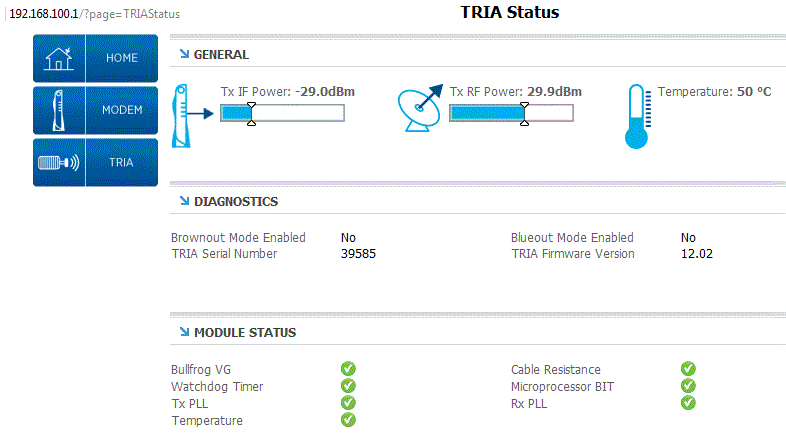 My position is 25km NE of Valencia, Spain. |
|
Mar 14th, 2012 at 12:12pm
The .bmp image file size from your email was 4,177,964 bytes or 33,423,713 bits. So, taking 65 seconds, your Tooway uplink speed was 514 kbit/s while sending this email. I have modified your image (now .gif format) and it is now only 24,687 bytes, so it quick to download by users of this forum, many of whom who have slow lines. If your Modem and TRIA status remain unchanged and good during your anomaly then it is unlikely that the problem has anything to do with your site. If you continue to get poor speeds at certain times so day, call your service provider. Unless they know there is nothing they can do. Ask where is your Gateway (GW7) teleport located ? Is there a possibility that there has been very heavy rain at your Gateway teleport each morning ? But, heavy rain at the teleport would cause your RX SNR to drop and vary erratically, prior failing completely if the rain was sufficiently severe. Prolonged slow speeds over many hours may be due to you exceeding one or more of your data transfer allowances. Ask your service provider about your FAP status and the traffic bar charts. The possibility of the network being overloaded is of concern and discussion with your service provider and Skylogic is the only way of resolving this. Why don't they have an online display of the traffic levels in each beam ? My guess is that some technical issue is present, such a traffic routing, DNS server etc, which they are not aware of and have not yet fixed. The more people tell them of the problem the better. You are located close to the centre of a blue beam Ref: https://www.satsig.net/tooway/satellite-dish-pointing-ka-sat-tooway-europe.htm This explains your rather good RX SNR. Best regards, Eric. |
|
Mar 14th, 2012 at 2:35pm
I can rule out low speeds due to exceeding my quota as I have never gone over 25% for any 4 week period and the level for one hour is so low that it doesn't even register on the scale. As Tooway are not even responding to my complaints, it seems I'm stuck with it until something better comes along!! |
|
Mar 14th, 2012 at 3:15pm
Best regards, Eric. |
|
Mar 14th, 2012 at 6:10pm
Any type of Webro should be OK,this is what I use on all Tooway installs after trying a cheaper version which caused all types of problems. I would try a new Tria as the next option |
|
Mar 14th, 2012 at 8:35pm
|
|
Mar 16th, 2012 at 9:39am
With mine it turned out to be vibration in cross-winds. The adjustable mount assembly is not as rigid as it needs to be for the rather heavy tranceiver, in my opinion. With all clamps tightened to the maximum safe level, the tranceiver was still trembling with about 2mm ampitude. There was no vibration in the mount pole. I had to add braces to the anenna arm to damp it down, and there have been no problems whatsoever from this since. Two mm might not appear to be much, but it imposes heavy amplitude modulation on the signal with the beamwidth being so small. I'm not saying this is YOUR problem. Just that, when all the typical causes can be discounted, it has to be something less probable, so it might be worth a look. Good luck John |
|
Mar 17th, 2012 at 7:09pm
This web-site took 2mins-16 sec to load. https://www.lonelyplanet.com/brazil |
|
Mar 17th, 2012 at 11:57pm
Is there something wrong with the Tooway network or routers ? Are you using their DNS servers ? Try different DNS servers ? Do the present DNS servers both work ? The Page Speed browser extension, available for Chrome and Firefox, may help diagnose the problem. Please would anyone else with Tooway "slow page loading" symptom, please say. Best regards, Eric. |
|
Mar 18th, 2012 at 6:02am
|
|
Mar 19th, 2012 at 2:08pm
This afternoon, www.bbc.com took 1m. 38s to load. The problem is definitely not my end. |
|
Email me:eric@satsig.net |