|
|

| SatSig Topics Index › Dish pointing and alignment › 10E from Mosul |
SatSig topic: 10E from Mosul(Read 4683 times) |
|
Aug 23rd, 2008 at 8:37am
After the first few days of trying to get a signal I unplugged from the modem and rebooted and haven't tried any reading through the modem. Since then I have only been trying to locate the satellite with the sat finder plugged into the LNB. My polarization is set at 36.6 and I have been staying in the general area of 223 Azimuth. You can see pics of the LNB on this Forum at https://www.satsig.net/topics/satsig-topic-num=1219216702.htm |
|
Aug 23rd, 2008 at 10:43am
The satellites are in a curved line across the sky. Once you have found a satellite, mark the scales on your mount so that you can always get back to that starting position. You are unlikely to be able to detect sidelobes using a satfinder and VSAT dish. It is much more likely that you have found the next satellite. Peak up and see if that is the satellite you want. Once peaked up, you can easily turn the polarisation 90 deg to see what is on the other polarisation. The satfinder also has a carrier recognition mode. The meter may be pre-programmed with an L band carrier frequency and symbol rate and text name for the satellite. If the L band carrier input matches, the meter will say "satellite found". This recognition process will only work if you have the correct LNB local oscillator frequency, the correct polarisation, correct satellite and the carrier is still in service. Once locked to an L band carrier, the display changes to "signal quality" or "BER" which relates to the power spectral density of just the wanted carrier. The display is no longer "total composite noise power". The indoor modem, which also needs to be programmed with an L band frequency and symbol rate, also locks up and displays "signal quality" on its management screen. Spend at least 30 minutes peaking up. A good trick to get to the centre is to physically half the distance between two equally degraded measurements either side of the peak. If your dish uses a big azimuth screw with two large nuts, move the nuts apart slightly and gently rest the dish against each alternately several times, adjusting one nut till the two degraded levels are identical, then wind both nuts in by the same number of turns and flats. In elevation, count the turns and flats via the peak and then back off to the centre. Mark a flat with a felt tip pen. To avoid damage to Hughes 7000 or HX modems/LNB or BUC: The multiway low voltage DC power cable between the power supply module and the modem should stay connected at all times. Always power on or off at the AC mains wall switch. Power off before connecting or disconnecting the coax cables. Best regards, Eric. |
|
Aug 24th, 2008 at 1:03pm
There is a hill on the horizon in the direction i am pointing, but it doesn't seem like it would be blocking my signal. Another vsat user mentioned that when I had my lnb and buc connected to the modem that he experienced interference on his end. So I have not pluged in on the Tx end again. Any thoughts? If evil spirits haunt dishes then I guess that would be the answer here. Does Bentley Walker have a paranormal tech division? |
|
Aug 24th, 2008 at 2:45pm
Please say what name (nominal) polarisation you are trying to receive from the 10E satellite ?. We know you need a +36.6 deg clockwise adjustment but I don't know from which starting position (LNB at top or LNB at the side). Have you programmed the modem with tuning information provided by Bentley Walker ? If so, what L band frequency and what symbol rate have you set?. Send me a copy of your configuration document to eric@satsig.net If the modem tuning and symbol rate are wrong, please say what they are ?. I can see both polarisations here using my on-line spectrum analyser. Maybe you are tuned, by accident, to a TDMA downlink that varies in level all the time. What is the type and model number of your LNB ? Best regards, Eric. |
|
Aug 24th, 2008 at 2:46pm
So does your modem know you were feeding it a EutelSat 10E signal? Or are the parameters from another connection still loaded? The modem has to know which satellite so it can calculate time and distance, it has to know exactly which frequency so it can actually detect a signal. And if the symbol rate and/or modulation type are incorrectly identified, they too can produce a "no signal" indication. //greg// |
|
Aug 24th, 2008 at 3:45pm
|
|
Aug 24th, 2008 at 4:52pm
My spectrum view of Eutelsat 10E Vertical is: 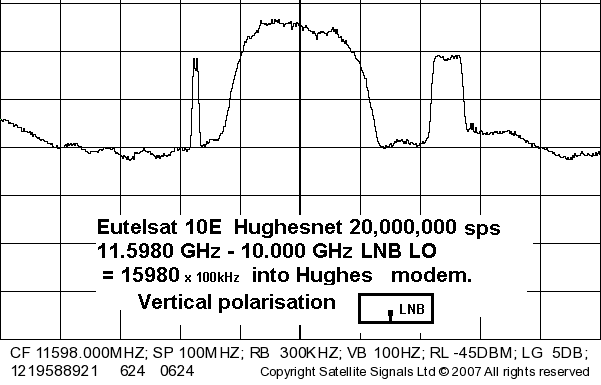 The antenna feed polarisation is presently wrong by about 90 deg so no signal, see left image below. Centre image shows a vertical polarisation start position (the LNB could be either side; it does not matter) The right image shows +36 deg clockwise adjustment applied - while facing towards the satellite. 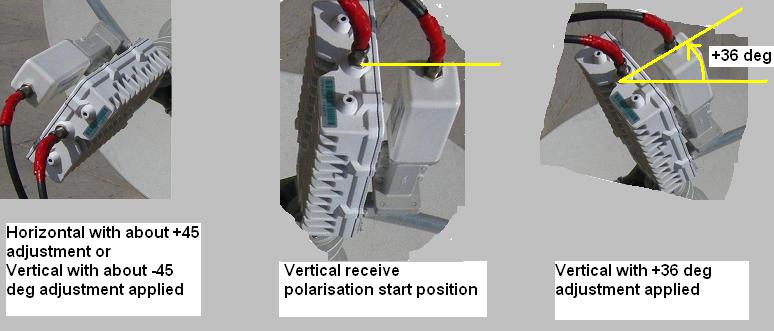 . .Best regards, Eric |
|
Aug 26th, 2008 at 1:10pm
All I needed is to correct the polarization and I should have a signal? I did adjust the polarization and am still seeing the frequency pulse up and down between 7 and 15. Could the possibility of a slight electric flow through my roof be causing a problem? |
|
Aug 26th, 2008 at 2:22pm
If you can properly peak up (using the meter) on any satellite you then know you have found a satellite. Move progressively along the orbit from one satellite to the next, along a diagonal line, till you come to the correct one with the wanted carrier that locks up the receiver in the modem. Regarding voltages between the roof and indoors. This can be a problem in a very few cases. The effect is superimposed AC mains current on the LNB/BUC cables. One solution is to run a really thick earth cable between the antenna mount and the indoor earth, with the assistance and advice of a competent and qualified local electrician. There may be local laws regarding earthing methods. There is danger of electric shock when you have any long cable earthed at one end, and I for one, always test with an AC voltmeter between the LNB and the outer of the LNB coax before holding both simultaneously. You can minimise AC mains or static voltage shock to the LNB by putting a wire between the LNB/BUC body and the coax outer before putting the F connector centre pin into the LNB socket. Sites with sand/rock soil and multiple generators and dubious interbuilding earthing are potential hazard areas. The antenna site may be completely 'floating' so can assume any static voltage or RF voltage if nearby to HF transmitter. Best regards, Eric. |
|
Email me:eric@satsig.net |