|
|

| SatSig Topics Index › Satellite Internet - Middle East › Can not access registration |
SatSig topic: Can not access registration(Read 5842 times) |
|
Apr 16th, 2009 at 5:16pm
"Your selected skin 'Skin1' is either not available or not a PRTG 6 compatible skin. Please check the 'webtemplates\Skin1' subfolder of your PRTG installation or select another skin in the options dialog. " This is well pass my skill level. Can someone explain what is going on. I tried shutting down everything and restarting. No change. |
|
Apr 16th, 2009 at 8:01pm
Your service provider should give you the necessary parameters for the manual configuration screen. It is probably best to leave unspecified parameters blank or unchanged from the default value. This applies particularly to the "hardware type" menus. Leave alone unless told otherwise. The 7 - 29 type readings indicate that you have the LNB connected to the modem and that you have successfully aimed your dish at some satellites, but that in no case did the signals received match what your modem was tuned for. It is strange that changing the elevation made no difference. I would expect the readings to change when you move the antenna across a satellite. Ask your service provider what is the name of the downlink polarisation ? It is very important that you set your polarisation to nominal and then apply the adjustment angle. Do this before searching the sky. Determine your pointing angles using Dish pointing Saudi Arabia and Middle East. Regarding your PRTG error message I wonder if you have a PRTG program running simultaneously on your PC. If so turn it off for the while. I don't know if the modem has any SNMP interface. Have just a single PC direct to the modem during set up. Best regards, Eric. |
|
Apr 17th, 2009 at 6:28am
|
|
Apr 17th, 2009 at 7:19pm
You don't say what satellite, your location or the name of the polarisation you are trying to receive. I assume you calculated the polarisation adjustment to be +45 deg clockwise. I assume you set the correct initial named polarisation. If the initial downlink polarisation name was horizontal then the LNB arm would have been upwards initially. Stand behind the dish and face towards the satellite. +45 means turn the feed or the entire dish +45 deg clockwise. Example showing Horizontal polarisation with 45 deg clockwise adjustment: 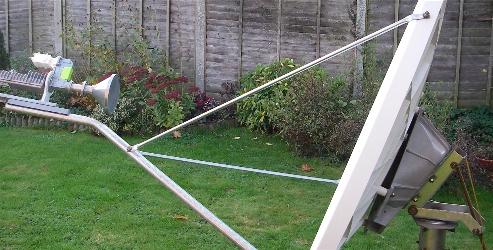 Elevation: If you have the new 1.2m Prodelin dish with a 3 axis positioner then the giant scale polarisation plate at the back is at right angles to the beam direction so setting the elevation angle is easy. Example: Using inclinometer scale: 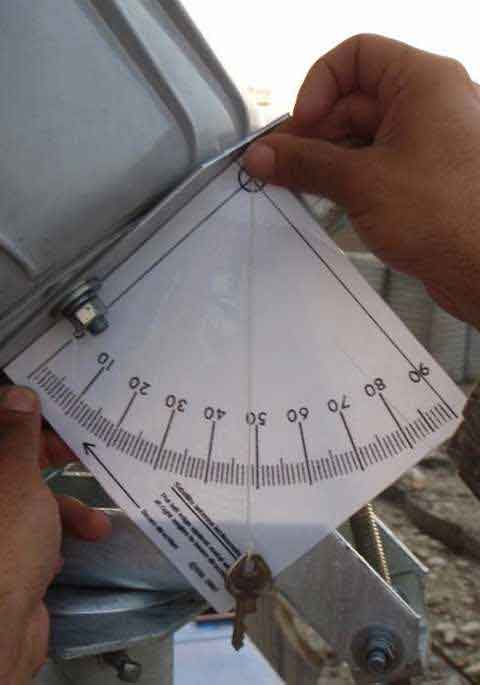 If you fail to find the satellite on the first bold sideways sweep try up and down in 1 deg increments. The other satellites are along a diagonal line across the sky. Modem configuration: Readings 0 to 29 are power only and vary in response to any and all satellites. The reading will not go above 29 into the range 30-100 till the modem locks to the wanted carrier and for this to happen the satellite, polarisation, LNB local oscillator frequency and modem configuration must all match. Check the config parameters. The HX rx carrier frequency is entered using 100kHz quantisation steps. If you have altered the "LNB type" from the default, try setting it back "Pure". This may change the DC supply volts and make the LNB LO correct. WAFA should have given you a config sheet. Enter only what is told and leave all else alone. Signal reading: If the reading is stuck and does not change when you point the dish across the satellites then you have an LNB cable problem. Check that you have only one cable in use from the LNB to the RX IN on the modem. You can leave the TX cable disconnected at both ends for now. Once you have connected the low voltage, multi-way, DC power cable between the black power module and the HX modem, never disconnect here again. Always power OFF and ON using the mains wall switch. Power OFF before any interference with the coax cables. The PRTG symptom suggests that you had the PRTG program running on your PC. This may have been scanning all IP addresses on the network looking for things to monitor. Right click on the lower bar of your browser and do Task Manager to find out what applications are running. If the parameters on the HX modem can never be changed ask WAFA for advice. If you still have problems send me a copy of the config sheet and the type/model number of LNB in use. eric@satsig.net Send a screen dump of the config screen as well (alt +prn scr, then paste into Paint and save as .jpg image for emailing). Please say when it all works and what was done to fix it. Best regards, Eric. |
|
Email me:eric@satsig.net |